REST, GraphQL, gRPC, WebSocket: The 4 Kinds of API, Explained
REST, GraphQL, gRPC, WebSocket៖ ស្វែងយល់ពី API ទាំង ៤ ប្រភេទ
Every app you use is a conversation between a client and a server. Here are the four ways that conversation usually goes, what each one is good at, and how to choose.
គ្រប់ App ដែលអ្នកប្រើប្រាស់រាល់ថ្ងៃ សុទ្ធតែជាការសន្ទនារវាង Client និង Server។ នេះជាវិធីទាំង ៤ ដែលគេនិយមប្រើបំផុត ចំណុចខ្លាំង ចំណុចខ្សោយ និងរបៀបជ្រើសរើសឱ្យត្រូវនឹងតម្រូវការ។
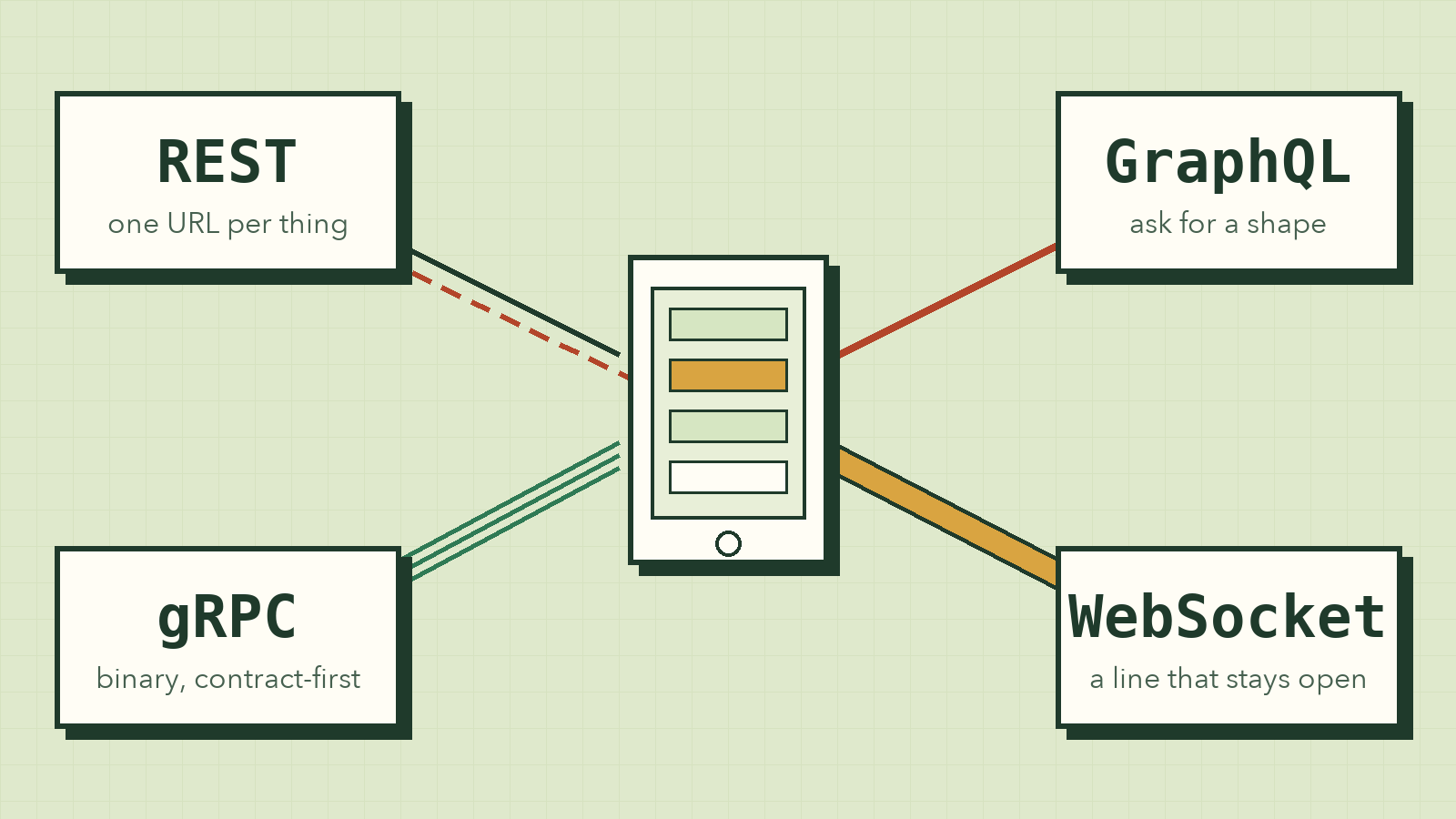
Open a food delivery app and scroll the restaurant list. None of those restaurants are stored on your phone. The app asks a server for them, the server answers, and the list appears. Tap a dish, and it asks again. Place the order, and it sends something the other way. Watch the rider move on the map, and now the server is the one talking.
Each of those moments goes through an API, an Application Programming Interface. The word sounds heavy, but the idea is small: an API is the set of rules for how one program asks another program for something.
This post covers the four API styles you'll meet most as a developer: REST, GraphQL, gRPC, and WebSocket. For each one I'll show what a request looks like, where it shines, and where it hurts.
First, what an API actually does
The classic analogy is a restaurant, and it holds up well.
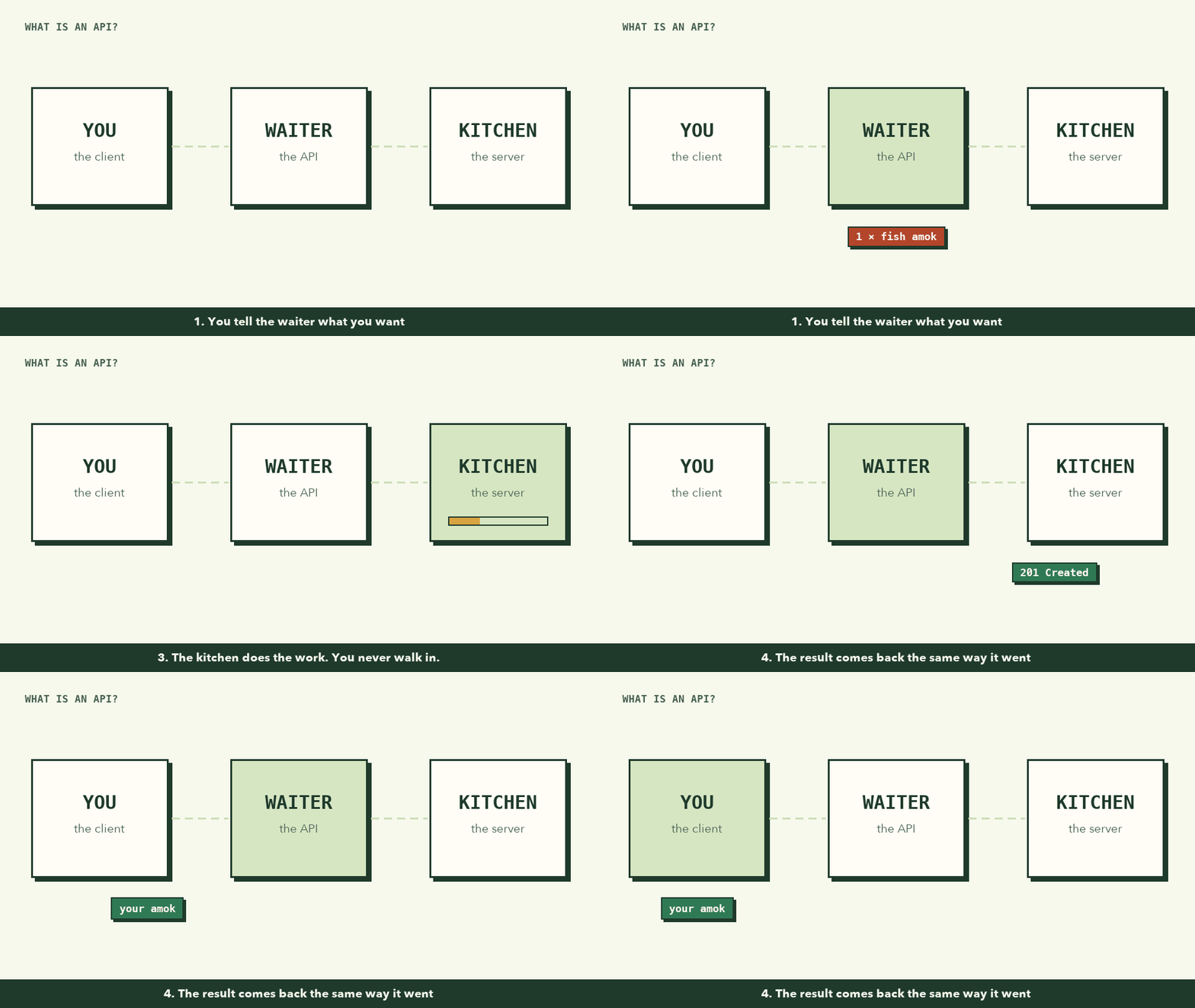
You don't walk into the kitchen and cook. You tell the waiter what you want, in a format the restaurant accepts (the menu). The waiter takes it to the kitchen, and the result comes back to your table.
In software:
- You are the client: a browser, a phone app, or another program.
- The kitchen is the server: the code, the database, the business rules.
- The waiter is the API: the agreed way of asking and answering.
The kitchen can change its stoves, recipes, or staff, and you never notice, as long as the waiter keeps taking the same orders. That's why APIs exist: two programs can work together without knowing each other's insides.
All four styles below solve this same problem. They differ in how the conversation goes: who speaks first, how many trips it takes, and what format the words are in.
1. REST: one address for every thing
REST (Representational State Transfer) comes from Roy Fielding's PhD dissertation in 2000, and it's what most people mean when they say "API." If you've ever called fetch() on a URL and got JSON back, you've probably used it.
The idea: every thing in your system gets its own URL, and you use plain HTTP verbs to act on it.
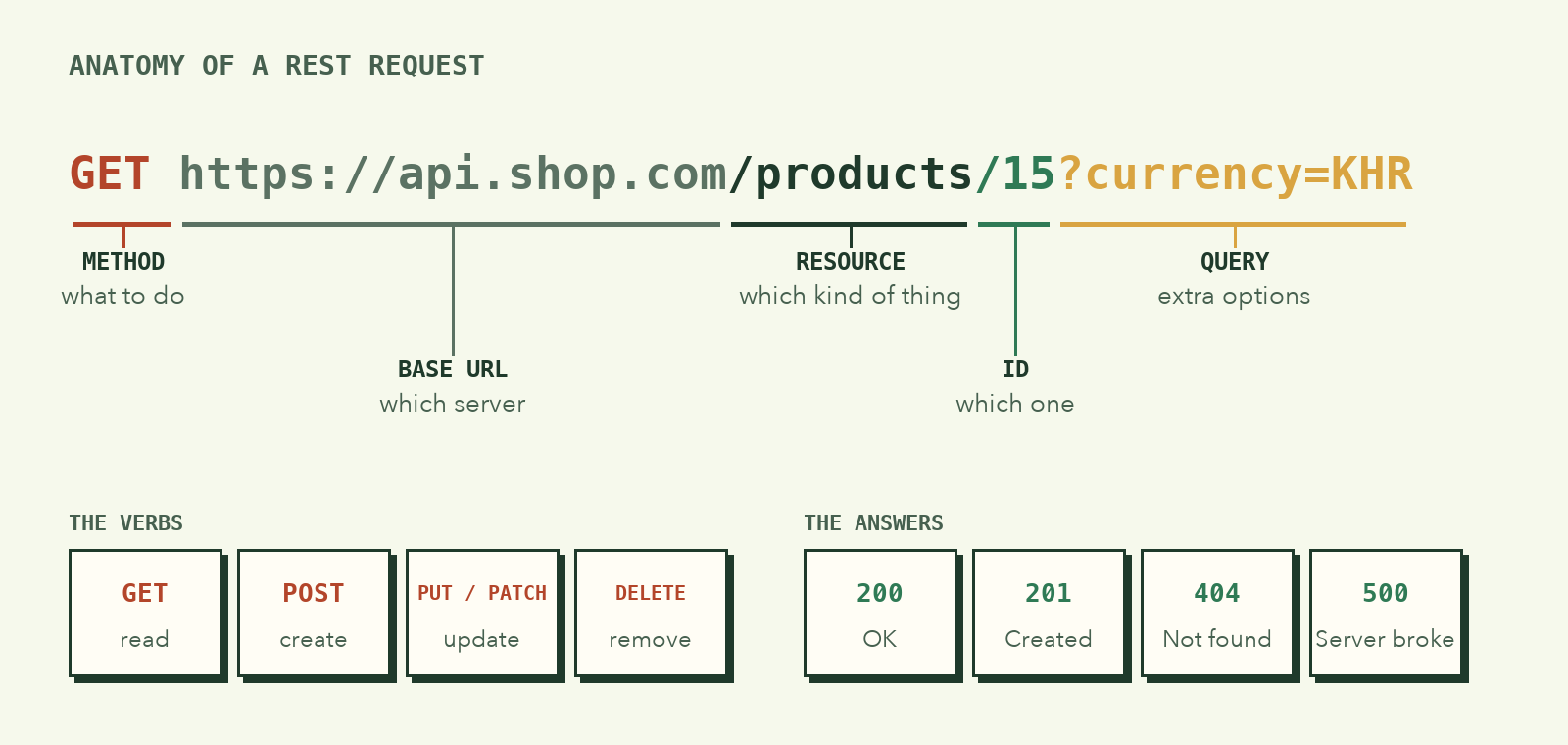
The thing is called a resource. Products, users, orders, comments: each is a noun with an address. The verb says what to do with it:
| Verb | Means | Example |
|---|---|---|
GET |
read | GET /products/15 |
POST |
create | POST /orders |
PUT / PATCH |
update | PATCH /orders/88 |
DELETE |
remove | DELETE /cart/items/3 |
The server answers with a status code and usually some JSON:
const res = await fetch("https://api.shop.com/products/15");
console.log(res.status); // 200
const product = await res.json();
// { "id": 15, "name": "Kampot pepper", "price": 4.5, "stock": 120, ... }
Why people love it
REST builds on HTTP, which every language, browser, and tool already speaks. You can test an endpoint by pasting it into the address bar. And because a GET to the same URL usually returns the same thing, browsers, CDNs, and proxies can cache the response without any extra work from you. Caching is a big deal: the fastest request is one that never reaches your server.
Where it starts to hurt
Say your profile screen needs a user's name, their posts, and the comments on one post. In REST, those are three resources at three URLs:
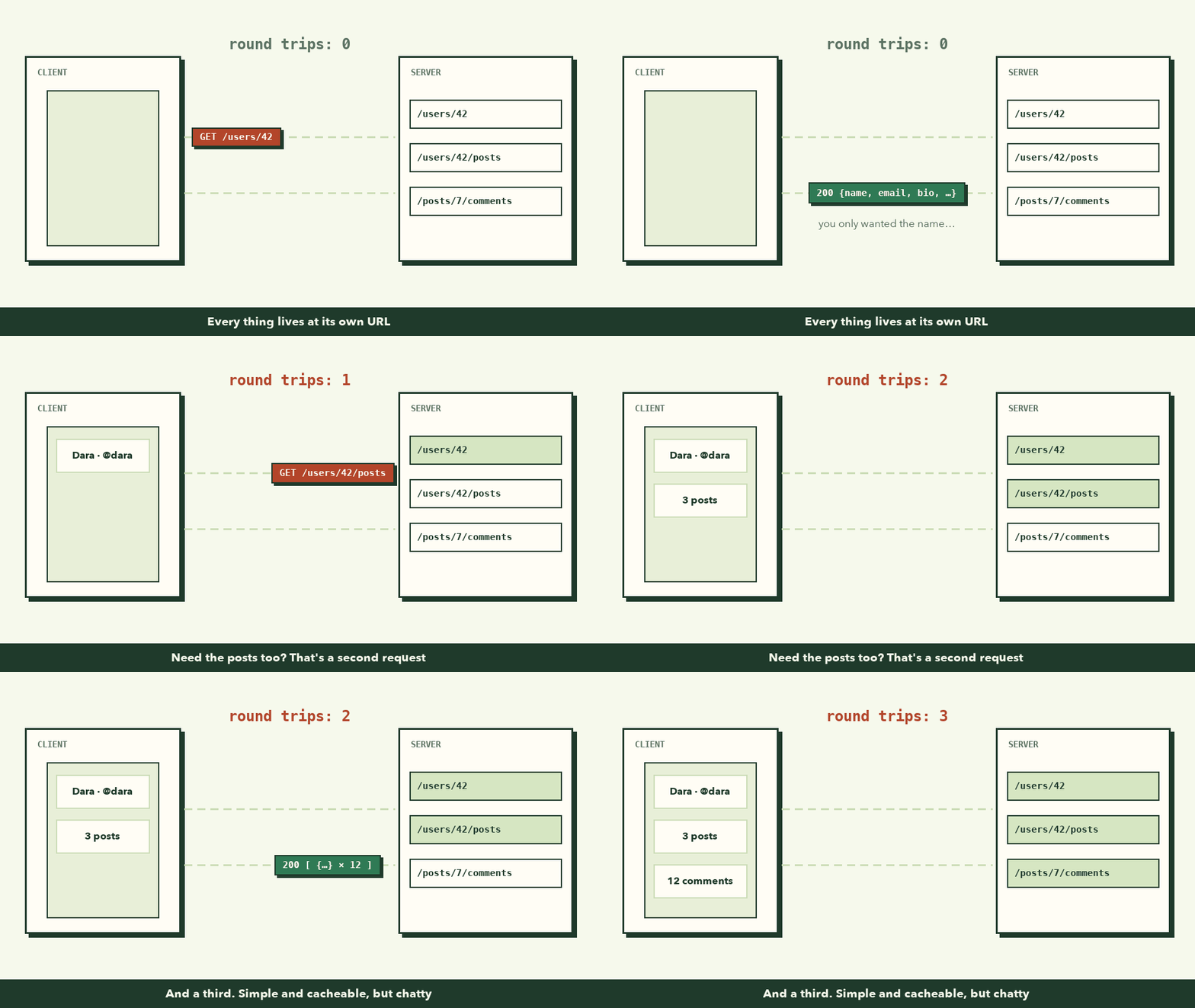
Two problems show up here:
- Under-fetching: one request isn't enough, so you make several. On a phone with weak signal, each round trip can add hundreds of milliseconds.
- Over-fetching:
GET /users/42sends back the whole user (email, bio, avatar, settings) when you only wanted the name.
You can work around both with custom endpoints like /profile-screen/42, but every new screen means a new endpoint, and the API slowly turns into a pile of special cases.
Use REST when: you're building a public API, a CRUD app, or honestly most projects. It's the default for good reason. Start here unless you have a specific problem one of the others solves.
2. GraphQL: ask for a shape, get that shape
Facebook built GraphQL in 2012 for exactly the problem above. Their mobile app needed data from many places for every screen, and REST meant either too many trips or too much data. They open-sourced it in 2015.
The idea: one endpoint, and the client describes exactly what it wants.
Instead of picking URLs, you write a query that looks like the data you want back:
query {
  user(id: 42) {
    name
    posts {
      title
    }
  }
}
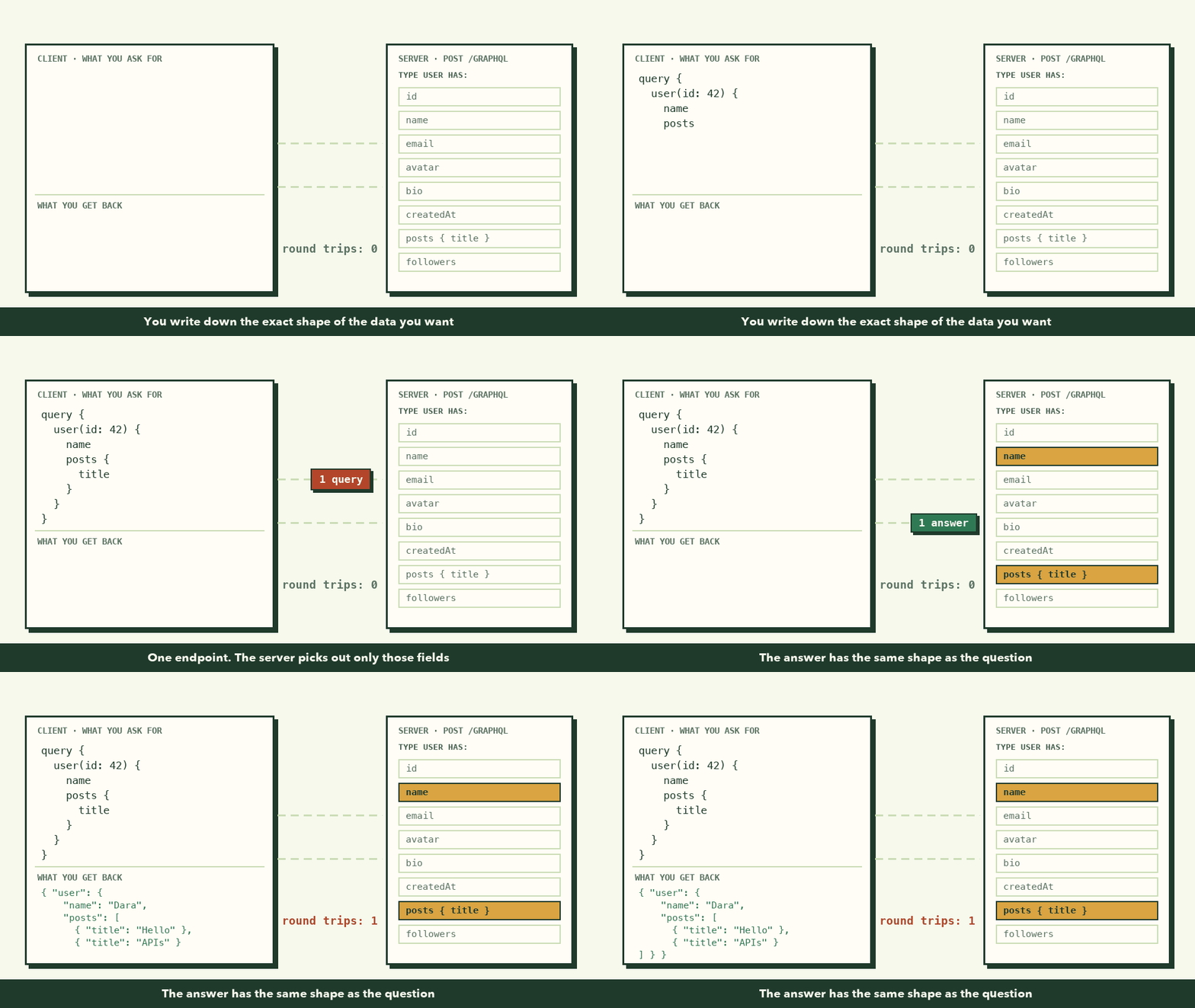
And the response has the same shape as the question:
{
  "data": {
    "user": {
      "name": "Dara",
      "posts": [{ "title": "Hello" }, { "title": "APIs" }]
    }
  }
}
One trip, no extra fields. Need the avatar on a different screen? Add avatar to that screen's query. The server doesn't change.
Under the hood, it's still HTTP. Every query is a POST to one URL:
const res = await fetch("https://api.example.com/graphql", {
  method: "POST",
  headers: { "Content-Type": "application/json" },
  body: JSON.stringify({
    query: `{ user(id: 42) { name posts { title } } }`,
  }),
});
const { data, errors } = await res.json();
The server publishes a schema, a typed list of everything you can ask for. That schema doubles as documentation, and tools use it to autocomplete your queries and catch typos before you run them.
What it costs
- Caching gets harder. Every request is a
POSTto the same URL, so the free HTTP caching REST gets doesn't apply. You need client libraries like Apollo or Relay, which cache by object instead of by URL. - The server does more work. Someone can write a deeply nested query (users → posts → comments → authors → posts...) that hammers your database. Real GraphQL servers need depth limits, query cost limits, and batching to avoid the "N+1 query" problem.
- Errors look different. A GraphQL response often comes back
200 OKwith anerrorsarray inside, so you can't rely on status codes alone.
Use GraphQL when: you have many screens or many clients (web, iOS, Android) that each need different slices of the same connected data, and the round trips and over-fetching of REST are actually hurting you.
3. gRPC: a fast, strict line between your own services
REST and GraphQL are mostly about clients like browsers and phones talking to a server. But inside a real company, most API calls never touch a browser. The order service calls the payment service, which calls the fraud service, which calls the user service. Thousands of times a second.
For that traffic, Google built gRPC (based on an internal system called Stubby) and open-sourced it in 2015. It makes calling another service feel like calling a function in your own code.
It starts with a contract file, written in Protocol Buffers:
syntax = "proto3";

service Payment {
  rpc Charge (ChargeRequest) returns (ChargeReply);
}

message ChargeRequest {
  int64 amount = 1;     // in riel
  string currency = 2;
}

message ChargeReply {
  bool ok = 1;
  string receipt_id = 2;
}
Both teams generate code from this one file, in whatever language they use: Go, Java, Python, Node. The calling side then just... calls it:
const reply = await payment.charge({ amount: 15000, currency: "KHR" });
console.log(reply.receiptId);
No URLs, no JSON parsing, no guessing field names. If the contract says amount is a number and you pass a string, it fails at compile time (or right away), not in production at 2 a.m.
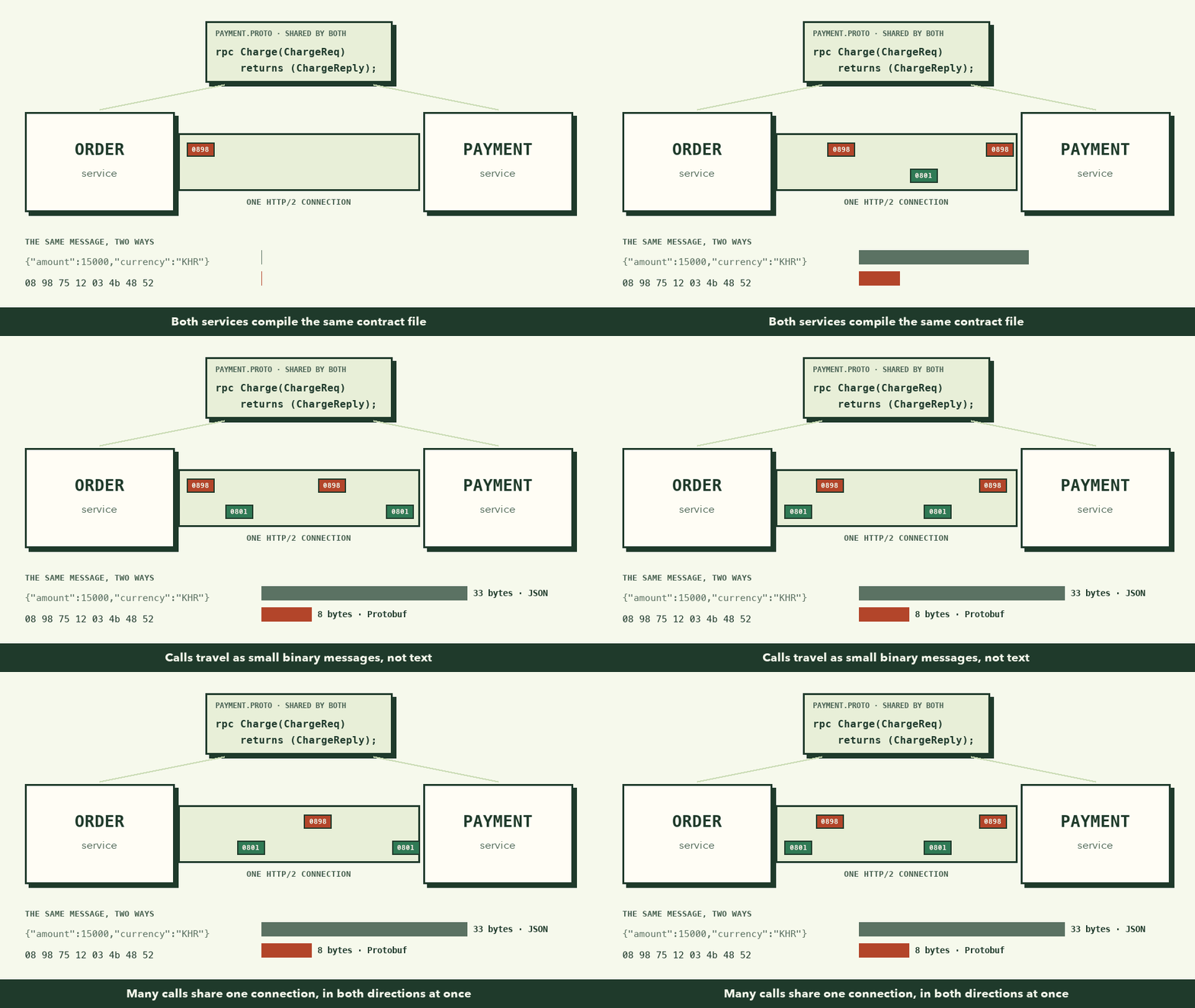
Two things make it fast:
- Binary messages. Protobuf doesn't send field names or quotes. It sends field numbers and packed values. The message above shrinks from 33 bytes to 8. Smaller messages mean less bandwidth and less CPU spent parsing text.
- HTTP/2. Many calls share one long-lived connection at the same time, and gRPC supports streaming in either direction, or both at once. A service can send a stream of updates without opening a new connection for each one.
The catch
- Browsers can't call it directly. Browsers don't give JavaScript the low-level HTTP/2 control gRPC needs. You need gRPC-Web plus a proxy, which is why gRPC mostly lives behind your public API.
- You can't read it. Binary on the wire means no peeking with
curland reading the response. You need tools likegrpcurlor Postman's gRPC mode. - More setup. Proto files, code generation, and keeping generated code in sync are extra steps compared to "just return JSON."
Use gRPC when: your own services talk to each other a lot, speed and strict types matter, and you control both ends of the line.
4. WebSocket: a line that stays open
All three styles above share one rule: the client asks, the server answers. The server can never speak first.
That's a problem for chat, live sports scores, multiplayer games, stock tickers, or that delivery rider moving across the map. The server knows something new happened, but it has no way to tell you until you ask.
The old workaround is polling: ask "anything new?" every few seconds. Most of the answers are "no," each one costs a full request, and a message can still wait several seconds before you see it.
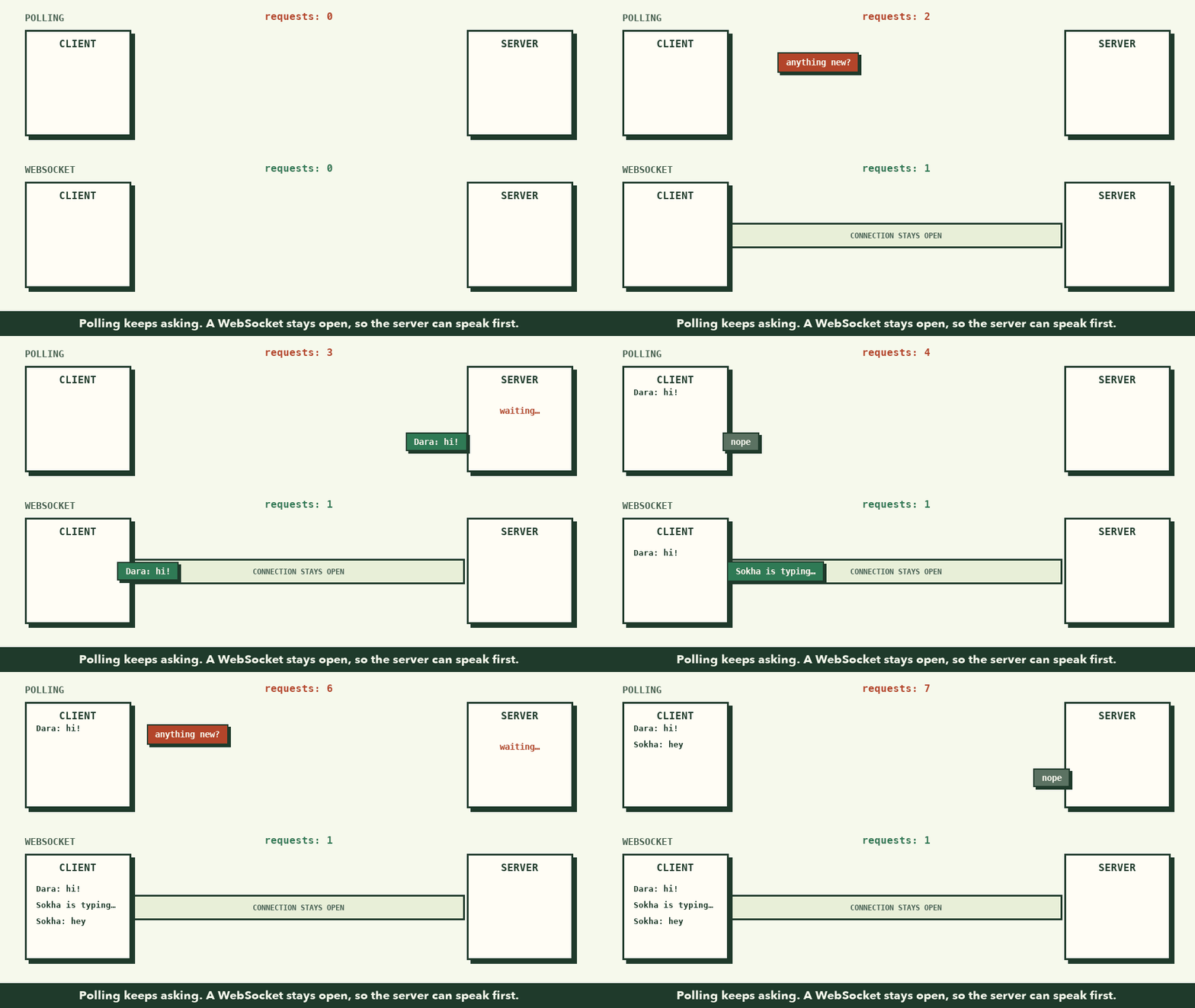
WebSocket (standardized in 2011 as RFC 6455) fixes this. The client starts with a normal HTTP request that says "let's upgrade." The server replies 101 Switching Protocols, and from then on the connection stays open and either side can send a message whenever it wants.
In the browser it takes a few lines:
const socket = new WebSocket("wss://chat.example.com/room/7");

socket.addEventListener("open", () => {
  socket.send(JSON.stringify({ type: "join", name: "Panha" }));
});

socket.addEventListener("message", (event) => {
  const msg = JSON.parse(event.data);
  console.log(`${msg.from}: ${msg.text}`); // shows up instantly
});
And a tiny Node server with the ws package that sends every message to everyone in the room:
import { WebSocketServer } from "ws";

const wss = new WebSocketServer({ port: 8080 });

wss.on("connection", (socket) => {
  socket.on("message", (data) => {
    for (const client of wss.clients) client.send(data.toString());
  });
});
The hard parts
- Connections are long-lived, so scaling changes. With REST, any server can answer any request. With WebSockets, each server holds thousands of open connections. If Dara is connected to server A and Sokha to server B, A and B need a way to pass messages between them, usually something like Redis pub/sub.
- You build the structure. A WebSocket only sends raw messages. Message types, replies, and what "join" means are all up to you (or a library like Socket.IO).
- Connections drop. Phones switch from Wi-Fi to mobile data, laptops sleep. Your client needs reconnect logic, and it needs to catch up on what it missed.
If only the server needs to push (live scores, notifications) and the client rarely talks back, look at Server-Sent Events (SSE) too. It's simpler, one-directional, and runs over plain HTTP.
Use WebSocket when: the server needs to push updates the moment they happen, or both sides talk often: chat, collaboration tools, games, live dashboards.
Side by side
| REST | GraphQL | gRPC | WebSocket | |
|---|---|---|---|---|
| Shape | Many URLs, one per resource | One URL, client writes queries | Functions defined in a contract | One open connection |
| Who speaks first | Client | Client | Client (or stream both ways) | Either side |
| Data format | Usually JSON | JSON | Protobuf (binary) | Anything you choose |
| Caching | Built in via HTTP | Needs a client library | Not really | Not applicable |
| Browser support | Native | Native | Needs gRPC-Web + proxy | Native |
| Best at | Public APIs, CRUD | Complex, nested data for many screens | Fast service-to-service calls | Real-time, two-way updates |
| Hardest part | Many trips, extra fields | Server complexity, caching | Setup, not human-readable | Scaling open connections |
So which one should I use?
If you're unsure, walk down this list and stop at the first "yes":
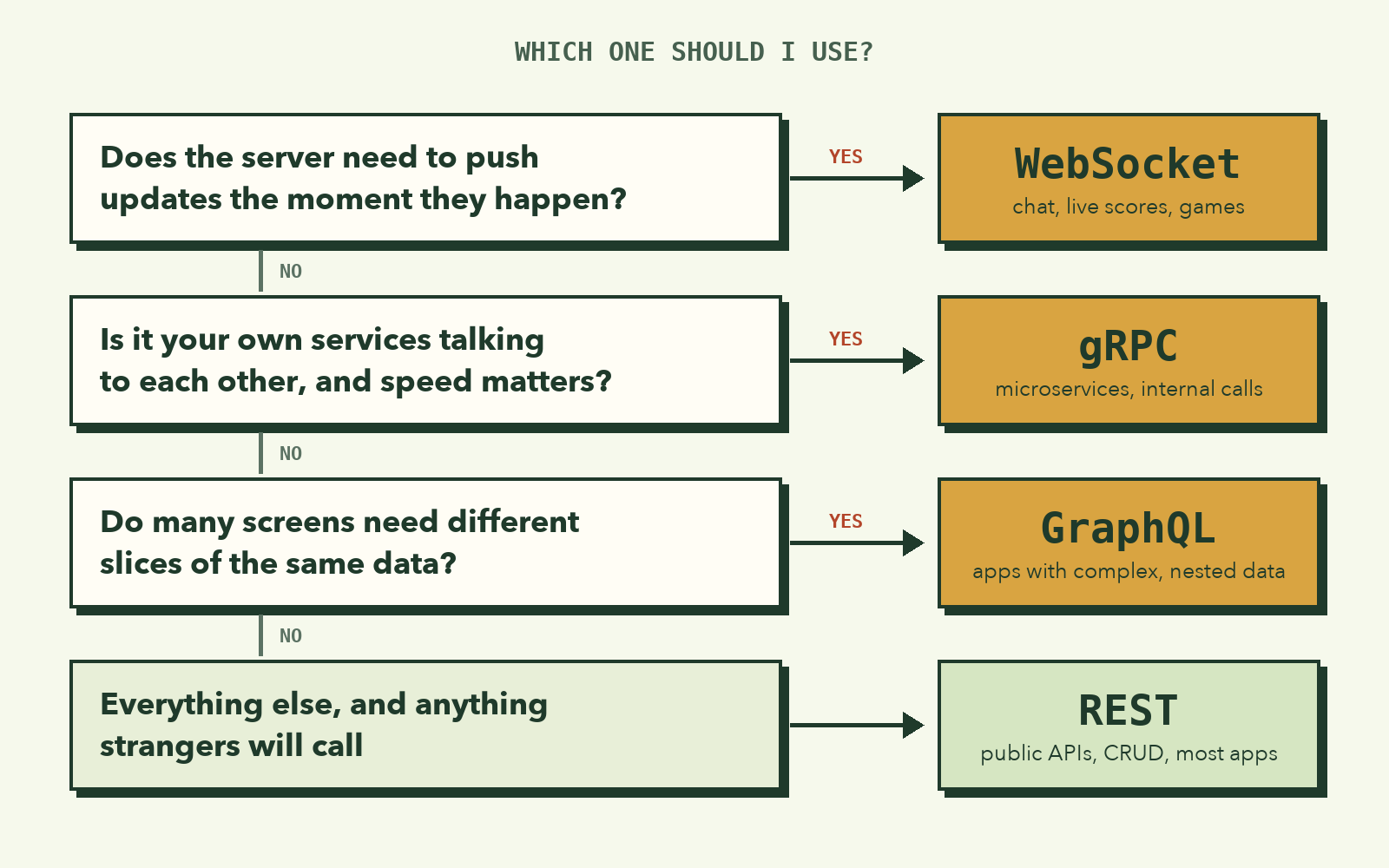
In real systems you rarely pick just one. That food delivery app from the start might use:
- REST for the restaurant list, menus, and placing orders.
- GraphQL for the home screen, which pulls promos, recent orders, and favorites in one query.
- gRPC between its internal order, payment, and rider-matching services.
- WebSocket to stream the rider's location to your map.
They work fine side by side. Each one is just a different kind of conversation.
Where's SOAP? You may see SOAP in older banking and government systems. It's an XML-based style from the late 1990s with strict contracts, a bit like an ancestor of gRPC. It's worth recognizing, but you're unlikely to pick it for a new project.
Try this before you close the tab
Open any web app you use daily, press F12 (or right-click → Inspect), and go to the Network tab. Reload the page.
- Filter by Fetch/XHR. Most of what you see will be REST calls. Click one and look at the URL, the method, and the JSON response.
- Look for a request to
/graphql. Click it and read the query in the request body. - Switch the filter to WS. If the site has chat or live updates, you'll see a WebSocket there. Click it and open the Messages tab to watch the conversation happen live.
You won't see gRPC, and now you know why: it's happening on the servers, out of the browser's sight.
Once you've watched real apps talk, these four stop being vocabulary and start being tools you can pick from.
សាកស្រមៃមើលពេលអ្នកបើក App កុម្ម៉ង់ម្ហូបមួយ ហើយអូសមើលបញ្ជីឈ្មោះហាងបាយ។ ឈ្មោះហាង រូបភាពម្ហូប និងតម្លៃទាំងអស់នោះ មិនមែនផ្ទុកនៅក្នុងទូរស័ព្ទរបស់អ្នកស្រាប់ឡើយ។ អ្វីដែលកើតឡើងគឺ App របស់អ្នកបានផ្ញើសំណួរទៅកាន់ Server រួច Server ក៏ឆ្លើយតបមកវិញនូវបញ្ជីហាងទាំងនោះ ដើម្បីយកមកបង្ហាញលើអេក្រង់។ ពេលអ្នកចុចមើលមុខម្ហូបមួយ App ក៏សួរទៅ Server ម្ដងទៀត។ ពេលអ្នកចុចកុម្ម៉ង់ App ក៏ផ្ញើព័ត៌មាននៃការទិញត្រឡប់ទៅវិញ។ ហើយនៅពេលអ្នកមើលផែនទីឃើញអ្នកដឹកជញ្ជូន (Rider) កំពុងជិះម៉ូតូមកជិតដល់ លើកនេះគឺជា Server វិញម្តង ដែលជាអ្នកប្រាប់មកទូរស័ព្ទរបស់អ្នកជាបន្តបន្ទាប់។
រាល់សកម្មភាពទាំងអស់នេះ សុទ្ធតែដំណើរការតាមរយៈ API (Application Programming Interface)។ ឈ្មោះរបស់វាស្ដាប់ទៅដូចជាបច្ចេកទេសធ្ងន់ធ្ងរបន្តិច ប៉ុន្តែគំនិតស្នូលរបស់វាសាមញ្ញបំផុត៖ API គឺជាសំណុំក្បួនច្បាប់ ឬជាភាសាកំណត់មួយ ដែលអនុញ្ញាតឱ្យកម្មវិធីមួយ អាចជជែក ឬស្នើសុំទិន្នន័យពីកម្មវិធីមួយទៀតបាន។
នៅក្នុងអត្ថបទនេះ យើងនឹងស្វែងយល់ពីទម្រង់ API ធំៗទាំង ៤ ដែលអ្នកនឹងជួបញឹកញាប់បំផុតក្នុងអាជីពជា Developer៖ REST, GraphQL, gRPC, និង WebSocket។ យើងនឹងមើលពីរូបរាងនៃ Request ជាក់ស្ដែង ចំណុចដែលវាធ្វើបានល្អបំផុត និងចំណុចដែលវាបង្កជាផលវិបាក។
ដំបូងបង្អស់ តើ API ដំណើរការយ៉ាងដូចម្ដេច?
ការប្រៀបធៀបដ៏ល្បី និងងាយយល់បំផុតសម្រាប់ API គឺ «ហាងអាហារ»។
ពេលអ្នកទៅញ៉ាំអីនៅហាង អ្នកមិនដែលដើរចូលទៅក្នុងផ្ទះបាយដើម្បីចម្អិនដោយខ្លួនឯងនោះទេ។ អ្វីដែលអ្នកធ្វើ គឺមើលម៉ឺនុយ ហើយប្រាប់អ្នករត់តុពីម្ហូបដែលអ្នកចង់បាន។ អ្នករត់តុក៏យកការកុម្ម៉ង់នោះទៅប្រាប់ចុងភៅក្នុងផ្ទះបាយ ហើយនៅពេលម្ហូបឆ្អិន គាត់ក៏លើកយកមកជូនអ្នកដល់តុ។
បើប្រៀបធៀបក្នុងពិភព Software៖
- រូបអ្នក (ភ្ញៀវ) គឺជា Client៖ អាចជា Browser, Mobile App ឬក៏ Program ផ្សេងទៀត។
- ផ្ទះបាយ គឺជា Server៖ កន្លែងផ្ទុកកូដ ប្រព័ន្ធទិន្នន័យ (Database) និង Business Logic ទាំងអស់។
- អ្នករត់តុ គឺជា API៖ ជាអ្នកនាំសារដែលទទួលការស្នើសុំ និងបញ្ជូនលទ្ធផលឆ្លើយតបទៅវិញទៅមកតាមទម្រង់ដែលបានព្រមព្រៀងគ្នា។
ផ្ទះបាយអាចប្តូរចង្ក្រានថ្មី ប្តូររូបមន្ត ឬប្តូរមេចុងភៅតាមចិត្ត ដោយអ្នកជាភ្ញៀវមិនចាំបាច់ដឹង ឬរងផលប៉ះពាល់អ្វីឡើយ ដរាបណាអ្នករត់តុនៅតែទទួលការកុម្ម៉ង់តាមរបៀបដដែល។ នេះហើយជាមូលហេតុចម្បងដែលគេបង្កើត API ឡើង៖ ដើម្បីឱ្យប្រព័ន្ធពីរអាចធ្វើការជាមួយគ្នាបាន ដោយមិនបាច់ដឹងពីភាពស្មុគស្មាញនៅខាងក្នុងរបស់គ្នាទៅវិញទៅមក។
ទម្រង់ API ទាំង ៤ ខាងក្រោមនេះ សុទ្ធតែកើតឡើងដើម្បីដោះស្រាយបញ្ហាមួយនេះដូចគ្នា។ អ្វីដែលខុសគ្នា គឺ របៀបនៃការសន្ទនា៖ តើនរណាជាអ្នកផ្ដើមនិយាយមុន? ត្រូវធ្វើដំណើរទៅមកប៉ុន្មានជើង? ហើយពាក្យសម្ដីដែលនិយាយតបឆ្លើយគ្នានោះស្ថិតក្នុងទម្រង់បែបណា?
១. REST៖ អាសយដ្ឋានមួយ សម្រាប់ទិន្នន័យនីមួយៗ
REST (Representational State Transfer) ត្រូវបានបង្កើតឡើងដោយលោក Roy Fielding ក្នុងសារណាថ្នាក់បណ្ឌិតរបស់គាត់កាលពីឆ្នាំ ២០០០ ហើយវាក៏ជាអ្វីដែលមនុស្សភាគច្រើននឹកឃើញមុនគេនៅពេលឮពាក្យថា "API"។ ប្រសិនបើអ្នកធ្លាប់សរសេរ fetch() ទៅកាន់ URL ណាមួយ ហើយទទួលបានទិន្នន័យជា JSON ត្រឡប់មកវិញ នោះមានន័យថាអ្នកធ្លាប់ប្រើប្រាស់វាហើយ។
គំនិតស្នូលរបស់ REST គឺ៖ រាល់ទិន្នន័យ ឬរបស់របរនៅក្នុងប្រព័ន្ធរបស់អ្នក ត្រូវតែមាន URL ផ្ទាល់ខ្លួនមួយ ហើយយើងប្រើប្រាស់ HTTP Verbs ធម្មតាៗដើម្បីធ្វើសកម្មភាពលើវា។
របស់របរទាំងនោះត្រូវបានគេហៅថា Resource។ ផលិតផល, គណនីអ្នកប្រើប្រាស់, ការកុម្ម៉ង់, មតិយោបល់៖ នីមួយៗសុទ្ធតែជានាមដែលមានអាសយដ្ឋានច្បាស់លាស់។ រីឯកិរិយាសព្ទ (Verb) គឺជាអ្នកបញ្ជាក់ថាយើងចង់ធ្វើអ្វីជាមួយវា៖
| Verb | អត្ថន័យ | ឧទាហរណ៍ |
|---|---|---|
GET |
អាន ឬទាញយកទិន្នន័យ | GET /products/15 |
POST |
បង្កើតទិន្នន័យថ្មី | POST /orders |
PUT / PATCH |
កែប្រែ ឬ Update ទិន្នន័យ | PATCH /orders/88 |
DELETE |
លុបទិន្នន័យ | DELETE /cart/items/3 |
Server នឹងឆ្លើយតបមកវិញនូវ Status Code អមជាមួយទិន្នន័យជា JSON៖
const res = await fetch("https://api.shop.com/products/15");
console.log(res.status); // 200
const product = await res.json();
// { "id": 15, "name": "ម្រេចកំពត", "price": 4.5, "stock": 120, ... }
ហេតុអ្វីបានជាគេនិយមប្រើវាខ្លាំងម្ល៉េះ?
REST ដំណើរការលើ HTTP ផ្ទាល់ ដែលភាសា Programming គ្រប់ប្រភេទ, Browser និង Tool ទាំងឡាយសុទ្ធតែយល់ និងចេះប្រើរួចជាស្រេច។ អ្នកអាចធ្វើតេស្ត Endpoint មួយបានយ៉ាងងាយ គ្រាន់តែចម្លង URL យកទៅបិទភ្ជាប់លើ Address bar នៃ Browser។ លើសពីនេះ ដោយសារតែការផ្ញើ GET ទៅកាន់ URL ដដែល តែងតែផ្តល់លទ្ធផលដូចគ្នា ដូច្នេះ Browser, CDN និង Proxy អាចជួយ Cache ទិន្នន័យនោះទុកបានភ្លាមៗ ដោយយើងមិនបាច់ចំណាយកម្លាំងរៀបចំច្រើនឡើយ។ ការ Cache នេះមានប្រយោជន៍ធំធេងណាស់ ព្រោះ Request ដែលលឿនបំផុត គឺ Request ដែលមិនចាំបាច់រត់ទៅដល់ Server នោះឯង។
ចំណុចដែលចាប់ផ្ដើមជួបការលំបាក
ឧបមាថាអ្នកកំពុងបង្កើតអេក្រង់ Profile មួយ ដែលត្រូវការបង្ហាញឈ្មោះអ្នកប្រើប្រាស់, អត្ថបទដែលគាត់បានផុស, និងខមមិននៅលើអត្ថបទមួយ។ នៅក្នុង REST របស់ទាំងបីនេះគឺជា Resource បីផ្សេងគ្នា ដែលស្ថិតនៅលើ URL បីដាច់ដោយឡែកពីគ្នា៖
បញ្ហាធំពីរនឹងកើតឡើងនៅត្រង់ចំណុចនេះ៖
- Under-fetching៖ ការផ្ញើ Request មួយជើងមិនគ្រប់គ្រាន់ឡើយ នាំឱ្យអ្នកត្រូវផ្ញើរហូតដល់ទៅ ៣ ដង។ បើនៅលើទូរស័ព្ទដែលមានសេវាខ្សោយ រាល់ជើងធ្វើដំណើរទៅមក (Round-trip) នីមួយៗអាចស៊ីពេលបន្ថែមរាប់រយមីលីវិនាទី។
- Over-fetching៖ ការហៅ
GET /users/42នឹងបញ្ជូនទិន្នន័យ User មកទាំងអស់ (ទាំង email, bio, avatar, settings) ខណៈពេលដែលអេក្រង់នោះត្រូវការតែឈ្មោះមួយមុខគត់។
អ្នកអាចដោះស្រាយបញ្ហាទាំងនេះបាន ដោយបង្កើត Endpoint ពិសេសមួយដាច់ដោយឡែក ដូចជា /profile-screen/42 ជាដើម។ ប៉ុន្តែរាល់ពេលដែល Designer បង្កើតអេក្រង់ថ្មីមួយ អ្នកត្រូវបង្កើត Endpoint ថ្មីមួយទៀត ហើយយូរៗទៅ API របស់អ្នកនឹងប្រែក្លាយទៅជាគំនរ Endpoint ពិសេសៗដែលពិបាកគ្រប់គ្រងជាទីបំផុត។
គួរជ្រើសរើស REST នៅពេល៖ អ្នកកំពុងបង្កើត Public API សម្រាប់ឱ្យអ្នកដទៃប្រើ, កម្មវិធីប្រភេទ CRUD ទូទៅ, ឬតាមពិតទៅគឺគម្រោងស្ទើរតែទាំងអស់។ វាជាជម្រើសដំបូងដ៏រឹងមាំ (Default choice)។ ចូរចាប់ផ្ដើមជាមួយ REST សិន លុះត្រាតែអ្នកជួបបញ្ហាជាក់លាក់ណាមួយ ដែលទាមទារឱ្យប្រើបច្ចេកវិទ្យា ៣ ផ្សេងទៀត។
២. GraphQL៖ ចង់បានទម្រង់បែបណា សុំបែបហ្នឹង
ក្រុមការងារ Facebook បានបង្កើត GraphQL ឡើងក្នុងឆ្នាំ ២០១២ គឺដើម្បីដោះស្រាយបញ្ហា Under-fetching និង Over-fetching ខាងលើនេះផ្ទាល់តែម្ដង។ កាលនោះ Mobile App របស់ Facebook ត្រូវការទាញទិន្នន័យពីកន្លែងជាច្រើនសម្រាប់រៀបចំអេក្រង់មួយៗ ហើយបើប្រើ REST វានឹងបង្កើតឱ្យមាន Round-trip ច្រើនពេក ឬផ្ទុកទិន្នន័យលើសច្រើនពេក។ ក្រោយមក ពួកគេក៏បានបើកវាជា Open-source នៅឆ្នាំ ២០១៥។
គំនិតស្នូលរបស់ GraphQL គឺ៖ មាន Endpoint តែមួយគត់ ហើយ Client ជាអ្នករៀបរាប់ច្បាស់ៗថាតើខ្លួនចង់បានទិន្នន័យអ្វីខ្លះ។
ជំនួសឱ្យការចាំ URL ច្រើន អ្នកគ្រាន់តែសរសេរ Query មួយ ដែលមានទម្រង់ស្រដៀងគ្នាបេះបិទទៅនឹងទិន្នន័យដែលអ្នកចង់បានមកវិញ៖
query {
  user(id: 42) {
    name
    posts {
      title
    }
  }
}
ហើយលទ្ធផលដែលឆ្លើយតបមកវិញ ក៏មានទម្រង់ដូចគ្នាទៅនឹងសំណួរដែលអ្នកបានសួរដែរ៖
{
  "data": {
    "user": {
      "name": "ដារ៉ា",
      "posts": [{ "title": "សួស្ដី" }, { "title": "ស្វែងយល់ពី APIs" }]
    }
  }
}
ធ្វើដំណើរតែមួយជើង គ្មានទិន្នន័យសល់លើសសូម្បីតែមួយតួអក្សរ។ ចុះបើនៅលើអេក្រង់មួយទៀតត្រូវការរូប Avatar បន្ថែម? ងាយណាស់ គ្រាន់តែបន្ថែមពាក្យ avatar ទៅក្នុង Query របស់អេក្រង់នោះទៅជាការស្រេច ដោយខាង Server មិនបាច់កែប្រែកូដអ្វីទាំងអស់។
នៅពីក្រោយខ្នង GraphQL នៅតែដំណើរការលើ HTTP ដដែល។ គ្រប់ Query ទាំងអស់ គឺជាការផ្ញើ POST ទៅកាន់ URL តែមួយគត់៖
const res = await fetch("https://api.example.com/graphql", {
  method: "POST",
  headers: { "Content-Type": "application/json" },
  body: JSON.stringify({
    query: `{ user(id: 42) { name posts { title } } }`,
  }),
});
const { data, errors } = await res.json();
ខាង Server នឹងកំណត់នូវ Schema មួយ ដែលបញ្ជាក់ពីប្រភេទ Type នៃទិន្នន័យទាំងអស់ដែលអាចសុំបាន។ Schema នេះដើរតួជាឯកសារជំនួយ (Documentation) ស្រាប់ ហើយ Tool ផ្សេងៗអាចយកវាទៅប្រើសម្រាប់ធ្វើ Autocomplete និងជួយចាប់កំហុសអក្ខរាវិរុទ្ធ (Typos) មុនពេលអ្នកដំណើរការកូដទៀតផង។
តម្លៃដែលអ្នកត្រូវបង់
- ការធ្វើ Cache កាន់តែស្មុគស្មាញ៖ ដោយសារតែគ្រប់ Request សុទ្ធតែជា
POSTទៅកាន់ URL ដដែល នោះសមត្ថភាព Cache ស្រាប់របស់ HTTP ដូចនៅលើ REST មិនអាចយកមកប្រើបានទៀតទេ។ អ្នកត្រូវពឹងផ្អែកលើ Client Library ដូចជា Apollo ឬ Relay ដែល Cache តាមរយៈ Object ID ជំនួសឱ្យ URL។ - Server ត្រូវទទួលបន្ទុកធ្ងន់៖ Client អាចសរសេរ Query ដែលមានលក្ខណៈ Nest ចូលគ្នាយ៉ាងជ្រៅ (users → posts → comments → authors → posts...) ដែលអាចធ្វើឱ្យ Database របស់អ្នកគាំងបានយ៉ាងងាយ។ ដូច្នេះ Server របស់ GraphQL ពិតប្រាកដ តម្រូវឱ្យមានការកំណត់កម្រិតជម្រៅ (Depth limits), ការកំណត់ថ្លៃចំណាយនៃ Query (Cost limits) និងការប្រើប្រាស់ Batching ដើម្បីដោះស្រាយបញ្ហា "N+1 Query"។
- ទម្រង់ Error ប្លែកពីគេ៖ ការឆ្លើយតបរបស់ GraphQL ភាគច្រើនតែងតែចេញ
200 OKទោះបីជាមានបញ្ហាក៏ដោយ ដោយវាភ្ជាប់មកជាមួយនូវ Arrayerrorsនៅខាងក្នុង ដូច្នេះអ្នកមិនអាចពឹងផ្អែកតែលើ HTTP Status Code ដូចមុនបានឡើយ។
គួរជ្រើសរើស GraphQL នៅពេល៖ អ្នកមានអេក្រង់ច្រើន ឬមាន Client ច្រើនប្រភេទ (Web, iOS, Android) ដែល Client នីមួយៗត្រូវការទិន្នន័យខុសៗគ្នាចេញពីប្រភពរួមតែមួយ ហើយបញ្ហា Round-trips និង Over-fetching របស់ REST ចាប់ផ្ដើមធ្វើឱ្យប៉ះពាល់ដល់ល្បឿន និងបទពិសោធអ្នកប្រើប្រាស់ពិតប្រាកដ។
៣. gRPC៖ ខ្សែតភ្ជាប់លឿន និងច្បាស់លាស់រវាង Internal Services
REST និង GraphQL ភាគច្រើនផ្តោតលើការទាក់ទងគ្នារវាង Client (ដូចជា Browser ឬទូរស័ព្ទ) ជាមួយ Server។ ប៉ុន្តែនៅក្នុងប្រព័ន្ធរបស់ក្រុមហ៊ុនធំៗ ការហៅ API ភាគច្រើនមិនដែលប៉ះពាល់ជាមួយ Browser ឡើយ។ សេវាកម្ម Order ត្រូវហៅទៅសេវាកម្ម Payment, សេវាកម្ម Payment ហៅទៅសេវាកម្ម Fraud, ហើយសេវាកម្ម Fraud ហៅទៅសេវាកម្ម User ជាដើម។ ការហៅឆ្លើយឆ្លងគ្នាបែបនេះកើតឡើងរាប់ពាន់ដងក្នុងមួយវិនាទី។
ដើម្បីដោះស្រាយចរាចរណ៍ទិន្នន័យដ៏ច្រើនបែបនេះ ក្រុមហ៊ុន Google បានបង្កើត gRPC ឡើង (កែច្នៃចេញពីប្រព័ន្ធខាងក្នុងរបស់ខ្លួនឈ្មោះ Stubby) ហើយបានដាក់ឱ្យប្រើជាសាធារណៈនៅឆ្នាំ ២០១៥។ វាធ្វើឱ្យការហៅទៅកាន់សេវាកម្មផ្សេង មានអារម្មណ៍ដូចជាការហៅ Function ធម្មតាមួយនៅក្នុងកូដផ្ទាល់ខ្លួនរបស់អ្នកអ៊ីចឹង។
វាចាប់ផ្ដើមឡើងដោយ កិច្ចសន្យា (Contract file) មួយ ដែលសរសេរឡើងដោយប្រើ Protocol Buffers (.proto)៖
syntax = "proto3";

service Payment {
  rpc Charge (ChargeRequest) returns (ChargeReply);
}

message ChargeRequest {
  int64 amount = 1;     // គិតជារៀល
  string currency = 2;
}

message ChargeReply {
  bool ok = 1;
  string receipt_id = 2;
}
ក្រុមការងារទាំងសងខាង អាចយក File តែមួយនេះ ទៅ Generate ចេញជាកូដទៅតាមភាសា Programming ដែលពួកគេប្រើរៀងៗខ្លួន មិនថាជា Go, Java, Python ឬ Node ឡើយ។ ខាងសេវាកម្មដែលចង់ហៅ គ្រាន់តែហៅវាបែបនេះ៖
const reply = await payment.charge({ amount: 15000, currency: "KHR" });
console.log(reply.receiptId);
គ្មាន URL, មិនបាច់ចំណាយពេល Parse JSON, ហើយក៏មិនបាច់អង្គុយទាយឈ្មោះ Field ដែរ។ ប្រសិនបើនៅក្នុងកិច្ចសន្យាកំណត់ថា amount គឺជាលេខ (Number) តែអ្នកបែរជាបញ្ជូនអក្សរ (String) ទៅវិញ កម្មវិធីនឹងចាប់កំហុសបានតាំងពីវគ្គ Compile Time (ឬពេលសរសេរភ្លាមៗ) មិនមែនចាំទាល់តែធ្លាយ Bug នៅម៉ោង ២ យប់លើប្រព័ន្ធ Production ទើបដឹងនោះឡើយ។
កត្តាសំខាន់ពីរដែលធ្វើឱ្យ gRPC មានល្បឿនលឿនអស្ចារ្យ៖
- ទិន្នន័យជាទម្រង់ Binary៖ Protobuf មិនបញ្ជូនឈ្មោះ Field ឬសញ្ញាសម្រង់
""ឡើយ។ វាបញ្ជូនតែលេខសម្គាល់ Field និងទិន្នន័យដែលត្រូវបានបង្រួមយ៉ាងណែនប៉ុណ្ណោះ។ ទិន្នន័យគំរូខាងលើ ប្រសិនបើសរសេរជា JSON ត្រូវចំណាយទំហំរហូតដល់ 33 bytes ប៉ុន្តែពេលបម្លែងជា Protobuf វាថយមកសល់ត្រឹមតែ 8 bytes។ កញ្ចប់ទិន្នន័យកាន់តែតូច មានន័យថាចំណាយ Bandwidth កាន់តែតិច ហើយ CPU ក៏មិនបាច់ខាតកម្លាំង Parse អក្សរដែរ។ - HTTP/2៖ ការហៅ API ច្រើនក្នុងពេលតែមួយ អាចរត់លើ Connection តែមួយបាន (Multiplexing) ហើយ gRPC គាំទ្រការធ្វើ Streaming ទាំងសងខាងក្នុងពេលដំណាលគ្នា (Bidirectional streaming)។ សេវាកម្មមួយអាចបាញ់ទិន្នន័យបន្តបន្ទាប់គ្នាជាខ្សែទឹក ដោយមិនបាច់បើក Connection ថ្មីរាល់ពេលនោះឡើយ។
ឧបសគ្គ និងចំណុចគួរយល់ដឹង
- Browser មិនអាចហៅវាដោយផ្ទាល់បានទេ៖ កម្មវិធី Browser មិនអនុញ្ញាតឱ្យ JavaScript គ្រប់គ្រងកម្រិតទាបនៃ HTTP/2 តាមតម្រូវការរបស់ gRPC ឡើយ។ អ្នកត្រូវប្រើ gRPC-Web រួមជាមួយ Proxy បន្ថែម ហេតុនេះហើយបានជាគេនិយមប្រើ gRPC នៅពីក្រោយខ្នង (Backend-to-Backend) ច្រើនជាងគេ។
- មនុស្សមិនអាចអានផ្ទាល់បានទេ៖ ដោយសារទិន្នន័យរត់លើខ្សែបណ្ដាញជា Binary ដូច្នេះអ្នកមិនអាចប្រើ
curlធម្មតាដើម្បីអានលទ្ធផលបានឡើយ។ អ្នកត្រូវប្រើប្រាស់ Tool ជំនួយដូចជាgrpcurlឬមុខងារ gRPC នៅក្នុង Postman។ - ការរៀបចំដំបូងមានច្រើនដំណាក់កាល៖ ការបង្កើត File .proto, ការ Setup កូដសម្រាប់ Generate និងការរក្សាទុកកូដដែលទើបបង្កើតឱ្យត្រូវគ្នា សុទ្ធសឹងតែជាការងារបន្ថែម បើធៀបនឹងការត្រឡប់ទិន្នន័យជា JSON ធម្មតា។
គួរជ្រើសរើស gRPC នៅពេល៖ សេវាកម្មខាងក្នុង (Internal Services ឬ Microservices) របស់អ្នកត្រូវជជែកគ្នាញឹកញាប់ ល្បឿន និងភាពត្រឹមត្រូវនៃ Type ជាអាទិភាពចម្បង ហើយអ្នកគឺជាអ្នកគ្រប់គ្រងប្រព័ន្ធទាំងសងខាងនៃខ្សែតភ្ជាប់នោះ។
៤. WebSocket៖ ខ្សែទាក់ទងដែលបើកចំហរហូត
ទម្រង់ API ទាំង ៣ ខាងលើ មានគោលការណ៍រួមមួយដូចគ្នាគឺ៖ Client ជាអ្នកសួរ Server ទើបឆ្លើយ (Request-Response)។ Server មិនអាចផ្តួចផ្តើមនិយាយមុនបានជាដាច់ខាត។
លក្ខខណ្ឌនេះនឹងក្លាយជាបញ្ហាធំសម្រាប់មុខងារដូចជា ប្រព័ន្ធឆាត (Chat), លទ្ធផលបាល់ទាត់ផ្ទាល់, ហ្គេមលេងច្រើននាក់ (Multiplayer games), តម្លៃភាគហ៊ុន ឬរូបភាពអ្នកដឹកជញ្ជូនដែលកំពុងរំកិលខ្លួនលើផែនទី។ Server ដឹងថាមានរឿងថ្មីកើតឡើង ប៉ុន្តែគ្មានមធ្យោបាយណាអាចប្រាប់មកអ្នកបានឡើយ ដរាបណាអ្នកមិនទាន់បានចុចសួរវា។
ដំណោះស្រាយចាស់កាលពីមុន គឺការធ្វើ Polling៖ ឱ្យទូរស័ព្ទសួរទៅ Server រៀងរាល់ ២ ឬ ៣ វិនាទីម្តងថា «តើមានអីថ្មីអត់?»។ ចម្លើយភាគច្រើនគឺ «គ្មានទេ» ដែលនេះធ្វើឱ្យខាតបង់ Request ដោយឥតប្រយោជន៍ ហើយសារមួយចំនួននៅតែត្រូវរង់ចាំប៉ុន្មានវិនាទីដែរ ទម្រាំតែបង្ហាញលើអេក្រង់។
WebSocket (ដែលបានក្លាយជាស្តង់ដារផ្លូវការ RFC 6455 ក្នុងឆ្នាំ ២០១១) បានមកកែប្រែបញ្ហានេះទាំងស្រុង។ Client ចាប់ផ្ដើមដោយការផ្ញើ HTTP Request ធម្មតាមួយទៅ Server ដើម្បីសុំ Upgrade។ Server ឆ្លើយតបមកវិញនូវលេខកូដ 101 Switching Protocols ហើយចាប់ពីវិនាទីនោះតទៅ ខ្សែតភ្ជាប់រវាងគ្នានឹងបើកចំហរហូត (Persistent Connection) ដែលភាគីទាំងសងខាងអាចផ្ញើសារទៅមករកគ្នាបានគ្រប់ពេលវេលាតាមចិត្តចង់ (Full-Duplex)។
នៅលើ Browser ការសរសេរកូដប្រើប្រាស់វាមានភាពសាមញ្ញបំផុត៖
const socket = new WebSocket("wss://chat.example.com/room/7");

socket.addEventListener("open", () => {
  socket.send(JSON.stringify({ type: "join", name: "Panha" }));
});

socket.addEventListener("message", (event) => {
  const msg = JSON.parse(event.data);
  console.log(`${msg.from}: ${msg.text}`); // បង្ហាញភ្លាមៗដោយមិនបាច់រង់ចាំ
});
ហើយនេះជាកូដ Node.js Server តូចមួយដោយប្រើកញ្ចប់បណ្ណាល័យ ws ដែលបញ្ជូនរាល់សារដែលទទួលបាន ទៅកាន់មនុស្សគ្រប់គ្នានៅក្នុងបន្ទប់ឆាត៖
import { WebSocketServer } from "ws";

const wss = new WebSocketServer({ port: 8080 });

wss.on("connection", (socket) => {
  socket.on("message", (data) => {
    for (const client of wss.clients) client.send(data.toString());
  });
});
ចំណុចលំបាក និងការប្រឈម
- Connection បើកចំហរហូត ធ្វើឱ្យការ Scale មានការប្រែប្រួល៖ សម្រាប់ REST ម៉ាស៊ីន Server ណាក៏អាចឆ្លើយតបសំណើបានដែរ។ ប៉ុន្តែសម្រាប់ WebSocket ម៉ាស៊ីន Server នីមួយៗត្រូវកាន់កាប់ Connection រាប់ពាន់ដែលកំពុងបើកចំហ។ ប្រសិនបើអ្នកប្រើឈ្មោះដារ៉ាភ្ជាប់ទៅ Server A ហើយសុខាភ្ជាប់ទៅ Server B នោះ Server A និង Server B ត្រូវតែមានមធ្យោបាយបញ្ជូនសារឆ្លងកាត់គ្នា ដែលជាទូទៅគេច្រើនប្រើប្រាស់ប្រព័ន្ធដូចជា Redis Pub/Sub។
- អ្នកត្រូវរៀបចំទម្រង់សារដោយខ្លួនឯង៖ WebSocket បញ្ជូនត្រឹមតែកញ្ចប់សារឆៅៗ (Raw messages) ប៉ុណ្ណោះ។ ការកំណត់ប្រភេទសារ, ការឆ្លើយតប, ឬអត្ថន័យនៃពាក្យ "join" សុទ្ធតែអាស្រ័យលើអ្នកជាអ្នកចាត់ចែង (ឬត្រូវប្រើ Library ជំនួយដូចជា Socket.IO)។
- បញ្ហាដាច់ Connection៖ ទូរស័ព្ទប្តូរពី Wi-Fi ទៅប្រើសេវាទូរស័ព្ទ, កុំព្យូទ័រ Sleep ពេលបិទគម្រប។ កូដ Client របស់អ្នកត្រូវតែមាន Logic សម្រាប់ Reconnect ឡើងវិញដោយស្វ័យប្រវត្តិ និងត្រូវទាញយកសារចាស់ៗដែលខកខានអំឡុងពេលដាច់នោះមកវិញ។
ប្រសិនបើប្រព័ន្ធរបស់អ្នកត្រូវការត្រឹមតែ Server រុញទិន្នន័យមក Client តែម្ខាងប៉ុណ្ណោះ (ដូចជាការបង្ហាញពិន្ទុបាល់ទាត់ ឬការផ្ញើ Notification) ដោយ Client មិនចាំបាច់ឆ្លើយតបទៅវិញទេ អ្នកក៏អាចពិចារណាប្រើ Server-Sent Events (SSE) ផងដែរ។ វាមានភាពសាមញ្ញជាង បញ្ជូនទិន្នន័យតែមួយទិសដៅ ហើយដំណើរការលើ HTTP ធម្មតា។
គួរជ្រើសរើស WebSocket នៅពេល៖ Server ត្រូវការរុញទិន្នន័យមកភ្លាមៗពេលមានបច្ចុប្បន្នភាពថ្មី ឬភាគីទាំងសងខាងត្រូវជជែកឆ្លើយឆ្លងគ្នាជាប្រចាំ៖ កម្មវិធីឆាត, ឧបករណ៍ធ្វើការរួមគ្នា (Collaboration tools), ហ្គេម, ឬ Dashboard ដែលបង្ហាញទិន្នន័យ Real-time។
ប្រៀបធៀបគ្នាក្បែរគ្នា
| REST | GraphQL | gRPC | WebSocket | |
|---|---|---|---|---|
| ទម្រង់ | URL ច្រើន, មួយ Resource មួយ URL | URL តែមួយ, Client សរសេរ Query សុំ | Function កំណត់ក្នុងកិច្ចសន្យា (.proto) | ខ្សែតភ្ជាប់មួយ បើកចំហរហូត |
| នរណានិយាយមុន | Client | Client | Client (ឬ Stream ទាំងសងខាង) | ភាគីណាក៏អាចផ្ញើមុនបាន |
| ទម្រង់ទិន្នន័យ | ភាគច្រើនជា JSON | JSON | Protobuf (Binary) | តាមការកំណត់របស់អ្នក |
| ការធ្វើ Cache | មានស្រាប់តាមរយៈ HTTP | ត្រូវការ Library ជំនួយ | ស្ទើរតែគ្មាន | មិនពាក់ព័ន្ធ |
| ការគាំទ្រលើ Browser | គាំទ្រស្រាប់ (Native) | គាំទ្រស្រាប់ (Native) | ត្រូវការ gRPC-Web + Proxy | គាំទ្រស្រាប់ (Native) |
| ពូកែខាងអ្វី | Public APIs, ប្រព័ន្ធ CRUD | ទិន្នន័យស្មុគស្មាញច្រើនផ្ទាំង | ការទាក់ទងគ្នារវាង Services យ៉ាងរហ័ស | ការ Update ភ្លាមៗបែប Real-time ទាំងសងខាង |
| ចំណុចពិបាកបំផុត | ដើរច្រើនជើង, លើសទិន្នន័យ | ភាពស្មុគស្មាញលើ Server, Cache | ការរៀបចំដំបូង, មនុស្សមើលមិនយល់ | ការគ្រប់គ្រង និង Scale Connection |
ចុះតើខ្ញុំគួរជ្រើសរើសមួយណា?
ប្រសិនបើអ្នកនៅមិនទាន់ប្រាកដចិត្តទេ សូមសាកល្បងដើរតាមលំដាប់លំដោយនេះ ហើយឈប់ត្រង់ចំណុចណាដែលត្រូវនឹងពាក្យថា «ត្រូវហើយ» ជាលើកដំបូង៖
នៅក្នុងប្រព័ន្ធជាក់ស្ដែង គេកម្រជ្រើសរើសប្រើតែមួយមុខណាស់។ កម្មវិធីកុម្ម៉ង់ម្ហូបដែលយើងបានលើកឡើងនៅដើមអត្ថបទ អាចនឹងប្រើប្រាស់បច្ចេកវិទ្យាទាំងអស់នេះរួមគ្នា៖
- REST សម្រាប់ទាញយកបញ្ជីហាង, ម៉ឺនុយម្ហូប និងការចុចកុម្ម៉ង់។
- GraphQL សម្រាប់អេក្រង់ដើម (Home screen) ដែលត្រូវការទាញយកប្រូម៉ូសិន, ការកុម្ម៉ង់ចុងក្រោយ និងហាងដែលចូលចិត្ត ក្នុង Query តែមួយជើង។
- gRPC សម្រាប់បម្រើការទំនាក់ទំនងរវាងសេវាកម្មខាងក្នុង ដូចជា Order Service, Payment Service និង Rider Matching Service។
- WebSocket សម្រាប់បញ្ជូនទីតាំងបច្ចុប្បន្នរបស់អ្នកដឹកជញ្ជូនរត់លើផែនទីក្នុងទូរស័ព្ទរបស់អ្នក។
ពួកវាអាចដំណើរការទន្ទឹមគ្នាបានយ៉ាងរលូន ព្រោះបច្ចេកវិទ្យានីមួយៗគ្រាន់តែជាទម្រង់នៃការសន្ទនាខុសៗគ្នាតែប៉ុណ្ណោះ។
ចុះទម្រង់ SOAP បាត់ទៅណាហើយ? អ្នកប្រហែលជាអាចនឹងឃើញ SOAP នៅក្នុងប្រព័ន្ធចាស់ៗរបស់ធនាគារ ឬប្រព័ន្ធរដ្ឋាភិបាលមួយចំនួន។ វាជាទម្រង់ដែលផ្អែកលើ XML តាំងពីចុងទសវត្សរ៍ឆ្នាំ ១៩៩០ ដែលមានកិច្ចសន្យាតឹងរ៉ឹង ស្រដៀងទៅនឹងដូនតារបស់ gRPC អ៊ីចឹង។ វាជារឿងល្អដែលយើងស្គាល់វា ប៉ុន្តែសម្រាប់គម្រោងថ្មីៗ អ្នកទំនងជាមិនជ្រើសរើសវាមកប្រើនោះឡើយ។
សាកល្បងដោយខ្លួនឯងមុនពេលបិទផ្ទាំងនេះ
បើក Web App ណាមួយដែលអ្នកប្រើប្រាស់រាល់ថ្ងៃ រួចចុច F12 (ឬ Right-click → Inspect) ហើយចូលទៅកាន់ផ្ទាំង Network។ បន្ទាប់មកចុច Reload ទំព័រនោះឡើងវិញ។
- ចុច Filter យក Fetch/XHR។ អ្វីដែលអ្នកឃើញភាគច្រើន គឺការហៅ REST នេះឯង។ ចុចលើ Request ណាមួយ រួចសង្កេតមើល URL, Method និងទិន្នន័យ JSON ដែលឆ្លើយតបមកវិញ។
- សាកស្វែងរក Request ណាដែលផ្ញើទៅកាន់
/graphql។ ចុចលើវា ហើយអានមើល Query ដែលស្ថិតនៅក្នុង Request Body។ - ប្តូរ Filter ទៅកាន់ WS វិញម្តង។ ប្រសិនបើគេហទំព័រនោះមានប្រព័ន្ធឆាត ឬការ Update ព័ត៌មានផ្ទាល់ អ្នកនឹងឃើញ WebSocket នៅទីនោះ។ ចុចលើវា រួចបើកផ្ទាំង Messages ដើម្បីទស្សនាការសន្ទនាដែលកំពុងកើតឡើងផ្ទាល់ភ្លាមៗ។
អ្នកនឹងមិនឃើញ gRPC នៅទីនោះទេ ហើយឥឡូវនេះអ្នកដឹងពីមូលហេតុច្បាស់ហើយ៖ ព្រោះវាដំណើរការនៅខាងក្នុង Server ផុតពីកែវភ្នែករបស់ Browser។
នៅពេលអ្នកបានឃើញកម្មវិធីពិតប្រាកដជជែកគ្នាដោយផ្ទាល់ភ្នែក ឈ្មោះទាំង ៤ នេះនឹងឈប់គ្រាន់តែជាពាក្យទ្រឹស្តីស្មុគស្មាញទៀតហើយ ប៉ុន្តែវាបានក្លាយជាឧបករណ៍ដ៏មានប្រយោជន៍នៅក្នុងប្រអប់ឧបករណ៍របស់អ្នក ដែលអ្នកអាចជ្រើសរើសយកមកប្រើប្រាស់បានយ៉ាងត្រឹមត្រូវ និងមានទំនុកចិត្ត។