Read the Design: From Picture to Boxes
Every great page starts as a picture someone liked. Before writing a single tag, learn to look at a design the way a developer does: as a set of named boxes, a handful of colors, and a few rules that repeat.
You've seen a design you love. Maybe it was on Pinterest, Dribbble, or someone's Instagram: soft blue cards, a character peeking out of a big rounded box, a little live clock in the corner. You want one like it.
Most beginners open their editor and start typing <div> and hoping. An hour later they have a page that sort of looks like the picture, and a stylesheet nobody, including them, can follow.
Professionals start somewhere else: they look at the picture until they can describe it in boxes and rules. That takes fifteen minutes, and it saves hours. This lesson is those fifteen minutes.
What we're building
Over this course you'll build this page from an empty folder:
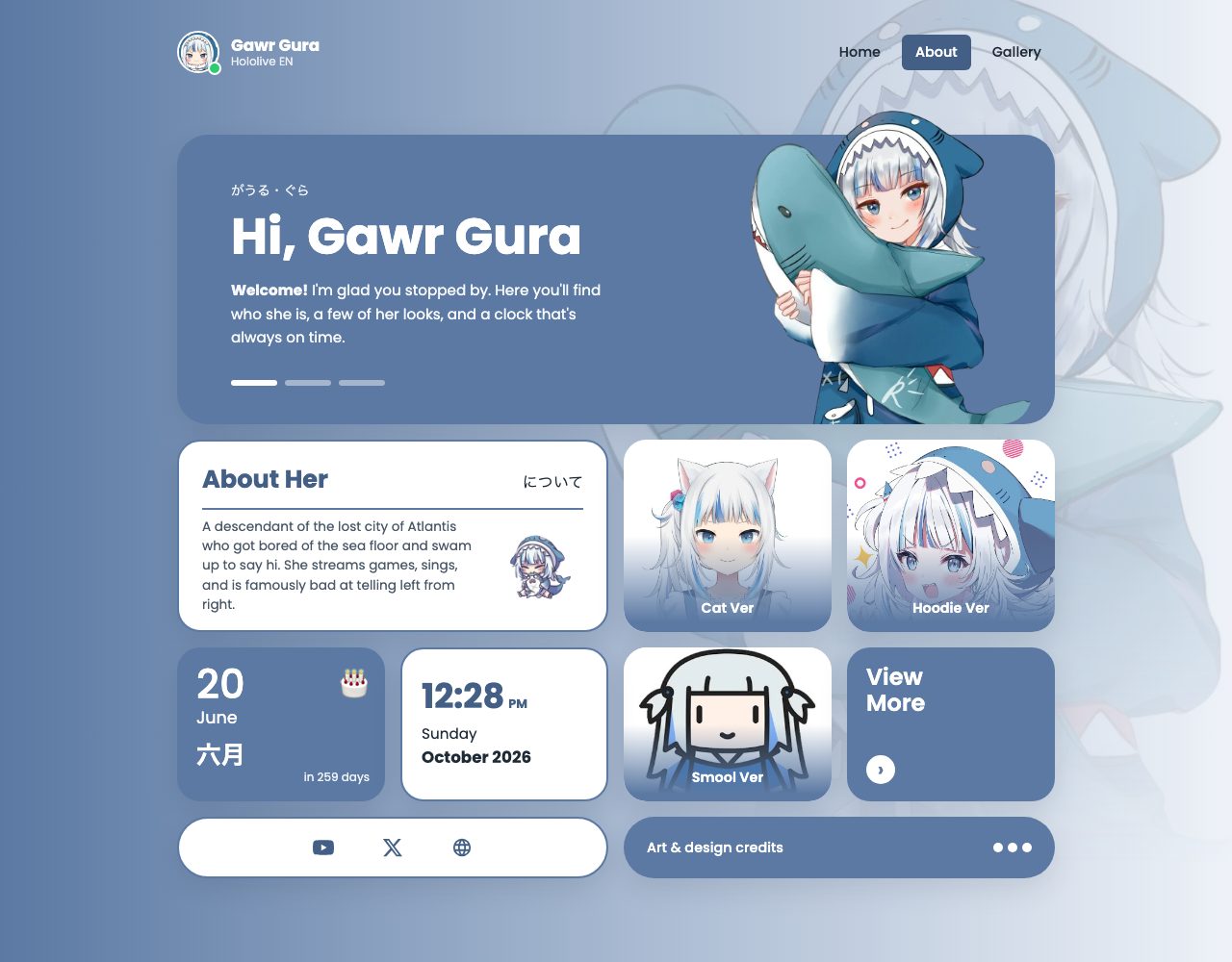
It's a fan profile page for Gawr Gura, built from a reference design by bnagraphics. Along the way you'll use:
- Semantic HTML for the structure
- CSS variables for every color and size
- Flexbox for the top bar
- CSS Grid for the whole card layout
- JavaScript for a live clock, a birthday countdown, a slider and a pop-up panel
- Media queries so it works on a phone
At the end, you'll swap in your own name, photos and facts, and it becomes your portfolio.
This course assumes you've done Web Foundations: you know what a tag is, and roughly how the box model works. Everything else is explained as we go.
About the art: the character images are fan art by other artists, credited on the page itself. When you make the page your own, use pictures you made, or ones you have permission to use, and always credit the artist.
Step 1: Find the boxes
Look at the design and squint. The details blur and the boxes are what's left. Then give every box a short, boring name:
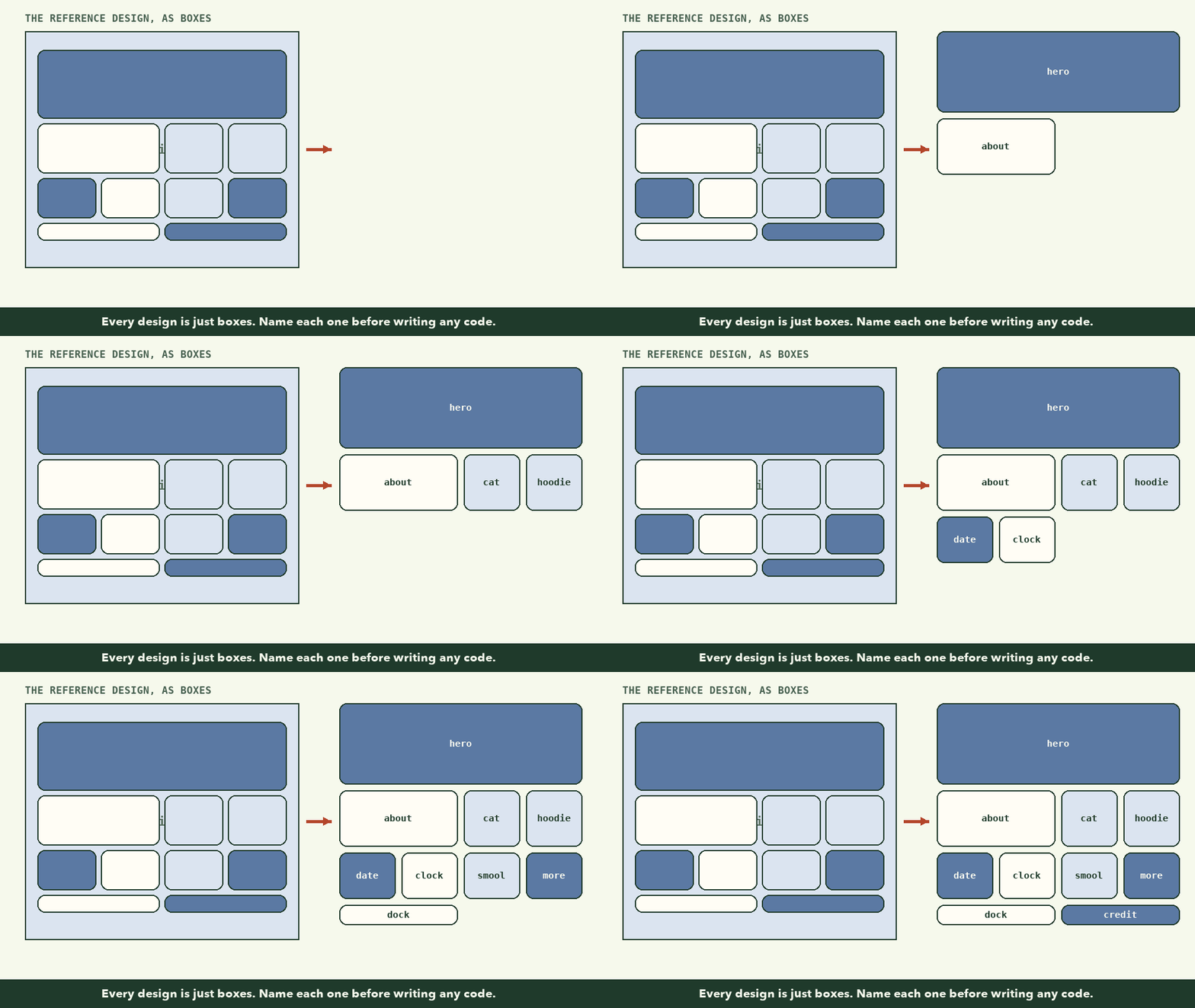
| Name | What's in it |
|---|---|
hero |
The big blue welcome card with the portrait |
about |
A short bio with a little sticker |
cat, hoodie, smool |
Three image cards, one per outfit |
date |
Her birthday, with a countdown |
clock |
A live clock |
more |
A "View More" link card |
dock |
A row of social links |
credit |
The credits bar |
Those names aren't just for planning. In lesson 5 you'll type almost exactly this list into CSS, and the browser will lay the page out from it.
Also notice what's outside the boxes: a top bar with a profile picture and three links, and a big faded copy of the portrait behind everything.
Step 2: Pull out the tokens
Next, look for things that repeat. A design usually uses far fewer colors and sizes than it first appears. These repeated values are called design tokens:
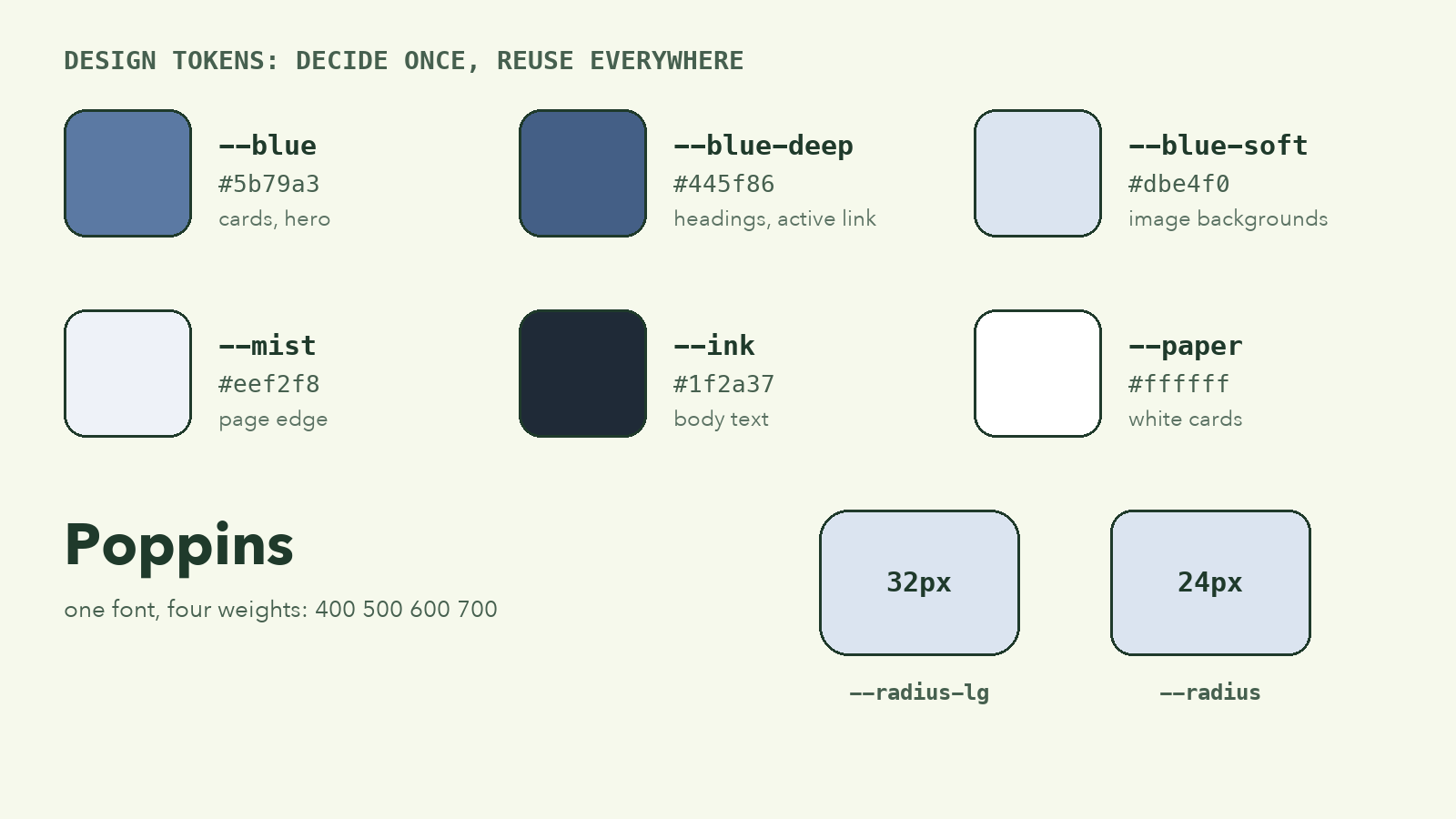
- Colors: one main blue, a darker blue for headings and the active link, a pale blue behind images, white, a near-black for text, and a light grey-blue at the edge of the page.
- Font: Poppins, a rounded geometric font. Four weights cover everything.
- Corners: the hero has slightly bigger corners (32px) than the small cards (24px).
- Spacing: every gap between cards is the same, 16px.
Write these down before you start. In lesson 3 they become the first lines of your stylesheet, and every other rule will point back to them. Change one, and the whole page follows.
Step 3: List what moves
Finally, note anything that isn't a still picture. Those are your JavaScript jobs:
- The clock shows the real time and updates by itself.
- The date card counts the days to her birthday.
- The three bars under the hero text are a slider. Click one and the message changes, and they rotate on their own.
- The ••• button in the credits bar opens a panel.
Four small features, each under 30 lines of code. Lessons 8 and 9 build them.
Try it: plan your own
🎯 Hands-on Task (អនុវត្តផ្ទាល់)
- Find a design you like: a portfolio, a dashboard, a profile page.
- Screenshot it, then draw boxes over it (on paper, or in any drawing app).
- Give every box a one-word name.
- Write down every color you can see. Then try to merge them down to six or fewer.
- Circle anything that moves or changes.
You're done when you could describe the design to a friend over the phone, box by box, without them seeing it.
What to remember
- Don't start with code. Start by naming the boxes.
- Find the tokens: the few colors, fonts and sizes that repeat.
- List what moves. Those are your JavaScript jobs.
- Plan with names you'll actually use in code:
hero,about,clock.
Next, we'll turn the box list into real HTML: The HTML Skeleton.