Responsive, Accessible, and Online
Most people will see your page on a phone. Rearrange the grid for small screens with one media query, run a quick accessibility check, publish it free on GitHub Pages, and then make it yours.
Here's an uncomfortable fact: if you share your portfolio link in a group chat, nearly everyone who opens it will be on a phone. They'll tap the link, glance for five seconds, and decide whether you're good at this.
On a phone, our four-column grid would squeeze each card to about 80 pixels wide. Text would wrap one word per line. The hero portrait would cover everything.
The good news: because we built the layout as a map of named areas, fixing it is mostly drawing a different map.
One media query, a new map
A media query applies CSS only when a condition is true, usually about the screen size:
/* ---------- 13. Phones and small tablets ---------- */
@media (max-width: 720px) {
  .bento {
    padding: 0 16px 32px;
    grid-template-columns: repeat(2, minmax(0, 1fr));
    grid-template-rows: auto auto 220px 160px 150px 56px 56px;
    grid-template-areas:
      "hero   hero"
      "about  about"
      "cat    hoodie"
      "date   clock"
      "smool  more"
      "dock   dock"
      "credit credit";
  }
}
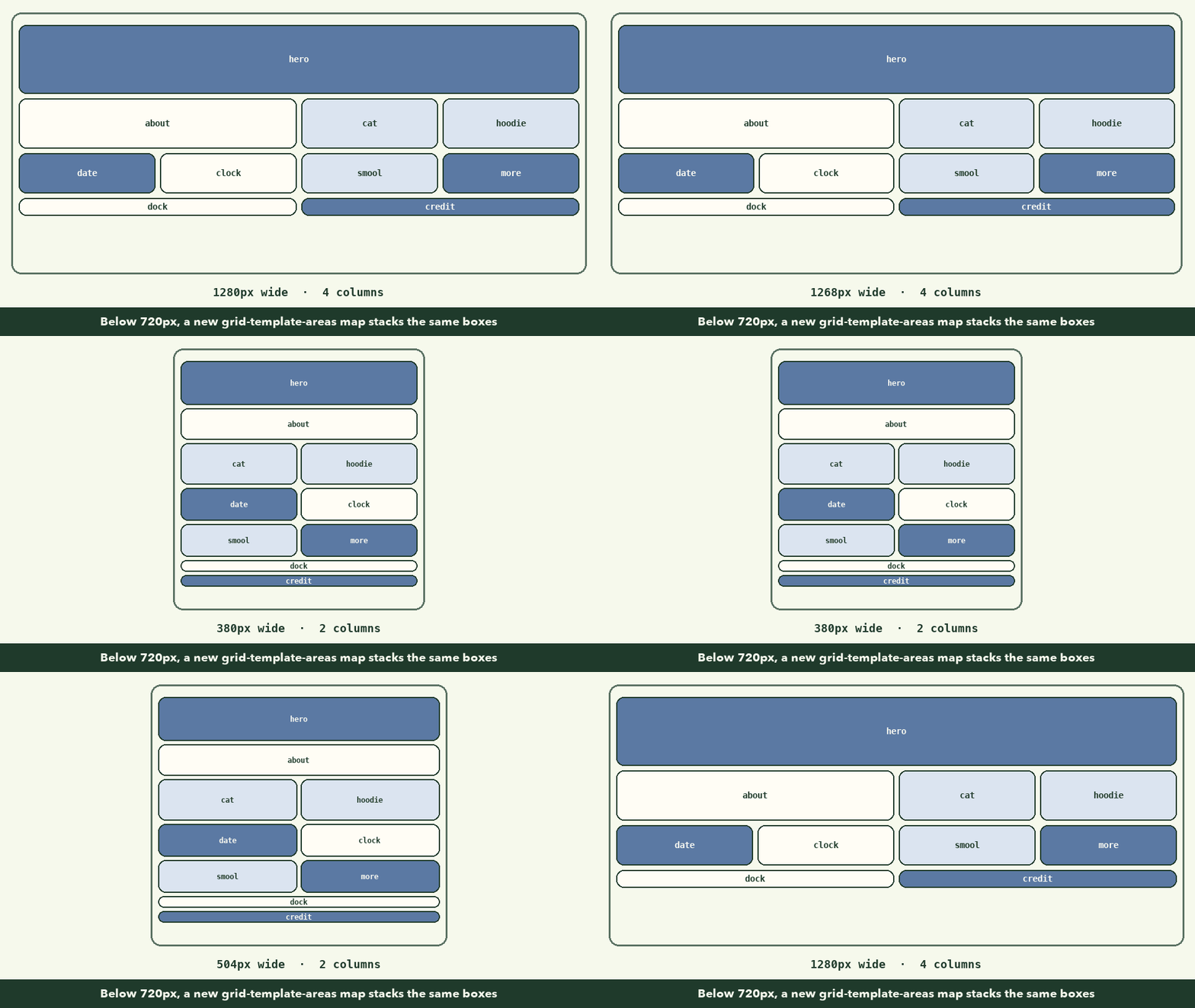
max-width: 720px means "only when the window is 720px wide or less". Inside, we redefine the grid: two columns instead of four, and a taller map with one row per pair of cards. Every card keeps its grid-area name, so we don't touch a single card rule.
That's the real payoff of grid-template-areas. On many sites, a phone layout means rewriting dozens of widths and floats. Here it's one new map.
The hero on a phone
The side-by-side hero doesn't fit, so the portrait moves underneath the text:
@media (max-width: 720px) {
  .hero {
    padding: 28px 24px 240px;
    margin-top: 0;
  }

  .hero-slides {
    max-width: none;
  }

  .hero-portrait {
    height: 220px;
    max-width: none;
    right: 50%;
    transform: translateX(50%);
  }
}
- The big bottom padding reserves room for the portrait under the text.
right: 50%plustranslateX(50%)centers an absolutely positioned element: move its right edge to the middle, then shift it right by half its own width.- The text may now use the full width (
max-width: none).
Checkpoint: on a phone

To test it yourself without a phone, open DevTools and click the device toolbar icon (it looks like a phone and tablet), then pick a phone size. Check at 375px wide, a common phone width, and at 320px, the smallest you're likely to meet.
Before you share it
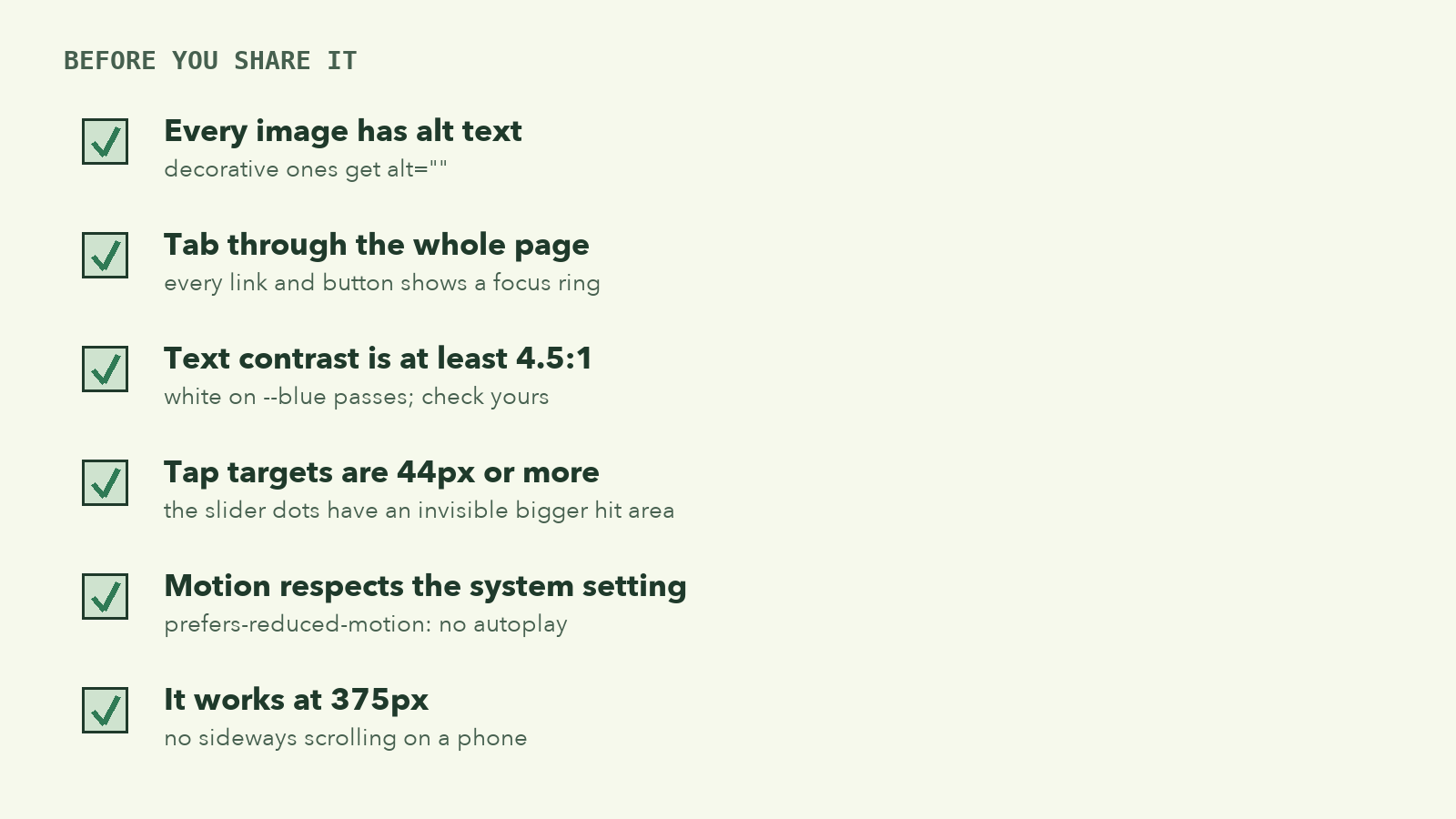
Accessibility isn't a separate feature you add at the end; most of it was built in as we went. Here's the checklist to confirm it:
-
Alt text. Every meaningful image is described; decorative ones have
alt="". (Lesson 2.) -
Keyboard. Put your mouse away and press Tab from the top. Every link and button should get a visible outline, in a sensible order. We made the outline obvious with:
a:focus-visible, button:focus-visible { outline: 3px solid var(--ink); outline-offset: 3px; }:focus-visibleshows the outline for keyboard users without showing it on every mouse click. -
Contrast. Small text needs a contrast ratio of at least 4.5:1 against its background. White on our
--bluepasses. If you change the colors, check yours with DevTools: inspect some text and look at the contrast number in the color picker. -
Tap targets. Anything tappable should be at least 44px in both directions. Our dock links are exactly 44px, and the slider dots have an invisible larger hit area. (Lessons 6 and 7.)
-
Motion. No autoplay when the system asks for reduced motion, and no transitions either:
@media (prefers-reduced-motion: reduce) { * { transition: none !important; } } -
Small screens. Nothing scrolls sideways at 375px.
Put it online, free
A site made of HTML, CSS, JavaScript and images is a static site: there's no server code, just files. Static sites can be hosted for free. GitHub Pages is one of the simplest:
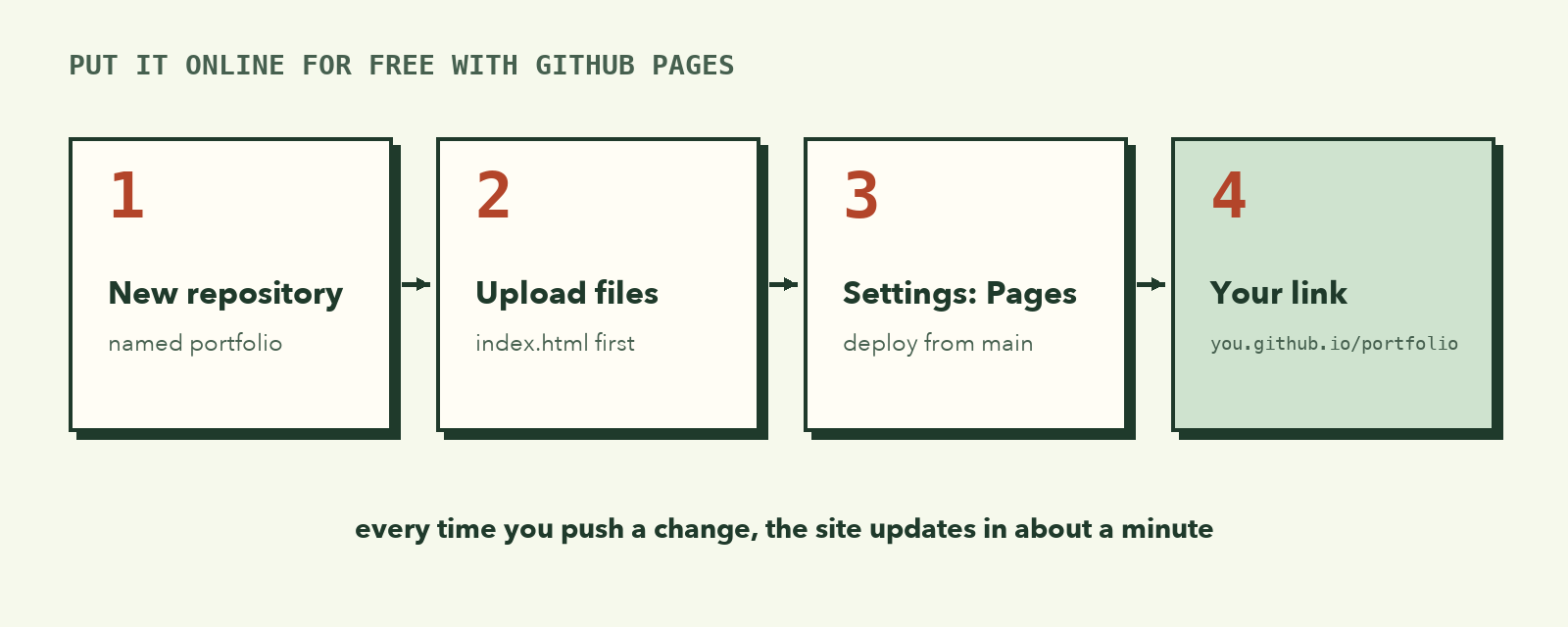
- Sign in at github.com and create a new repository called
portfolio. Make it public. - Click Add file → Upload files, and drag in
index.html,style.css,script.jsand theimagesfolder.index.htmlmust be at the top level, not inside another folder. Click Commit changes. - Open Settings → Pages. Under Build and deployment, choose Deploy from a branch, pick main and / (root), and save.
- Wait a minute, then refresh. GitHub shows your address:
https://your-username.github.io/portfolio/.
Every time you upload a change, the live site updates by itself within a minute or two. If you've done the terminal guide, you can push with Git instead of uploading files; the result is the same.
Make it yours
The page you built is a fan page. The skills are the point, so now turn it into your portfolio:
🎯 Hands-on Task (អនុវត្តផ្ទាល់)
- Your name and photo. Replace the name, the avatar and the hero portrait. Remove the background from your photo first (many free tools do this), so it can poke out of the hero.
- Your story. Rewrite the three slides: who you are, what you're learning, what you want to build.
- Your work. Turn the three image cards into your three best projects, each linking to the live project or its code.
- Your date. Change
BIRTHDAY_MONTHandBIRTHDAY_DAY, or make the card count down to something else: a graduation, a launch, a trip.- Your links. Point the dock at your GitHub, LinkedIn, email or Telegram.
- Your colors. Change the tokens in
:root. Then run the contrast check again.- Credits. Keep the credits panel, and list the source of every image, font and design idea you used.
You're done when someone who's never met you could open the link and know who you are, what you can do, and how to reach you.
You finished the course 🎉
Look at what you can do now:
- Plan a page from a picture: boxes, tokens, behaviours
- Structure it with semantic, accessible HTML
- Style it with variables, flexbox, Grid, positioning and pseudo-elements
- Animate it with JavaScript that respects the people using it
- Adapt it to any screen and publish it for the world
These are the same tools professional front-end developers use every day. The next step is to build something nobody gave you a picture of.
What to remember
- A media query applies CSS only on certain screens; with grid areas, a phone layout is often just a new map.
- Test at 375px and 320px, with the keyboard, and with reduced motion on.
- Static sites (HTML, CSS, JS, images) can be hosted free on GitHub Pages.
- Always credit the art, fonts and designs that aren't yours.