Conditions: Teaching Code to Decide
Real programs react differently to different situations. Learn if, else if and else, comparison operators, and how to combine conditions with && and ||.
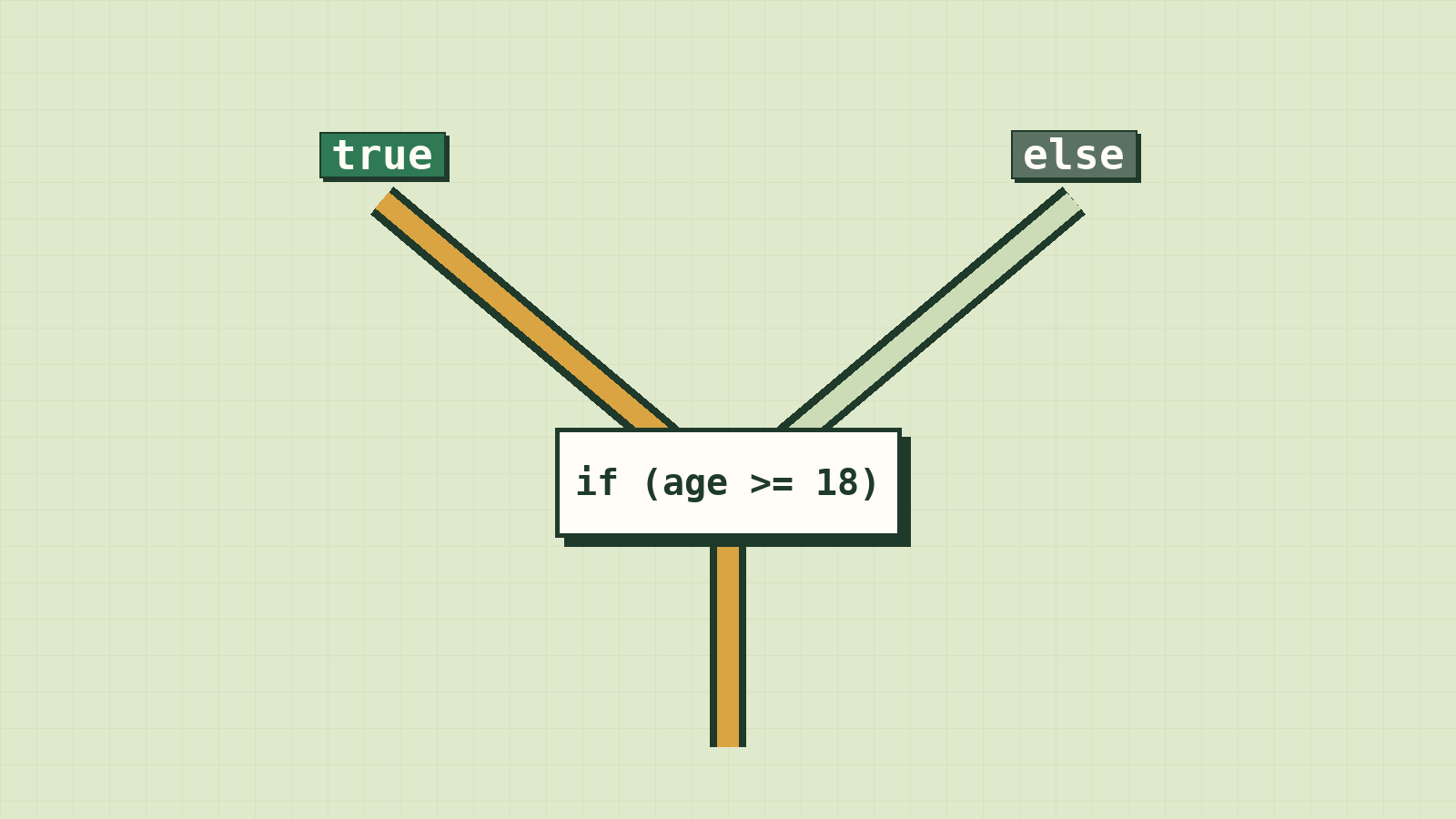
Every app you use is constantly making decisions. Is the password right? Is the cart empty? Is it night, so the screen should go dark? Is this user old enough to see this page?
Until now, our programs ran every line, top to bottom, no matter what. Real programs choose. They ask a yes-or-no question and take a different path depending on the answer.
That's what conditions are: the forks in the road of your program.
Programs need to make choices
So far our programs run every line, top to bottom. But real life is full of decisions:
- If the password is correct, log in. Otherwise, show an error.
- If the cart is empty, hide the checkout button.
- If it's after 6pm, switch to dark mode.
A condition is a question whose answer is true or false (a boolean, from the last lesson). The program then picks a path based on the answer.
Asking questions: comparison operators
| Operator | Question it asks | Example | Result |
|---|---|---|---|
=== |
Are these equal? | 5 === 5 |
true |
!== |
Are these different? | 5 !== 3 |
true |
> |
Is the left bigger? | 10 > 3 |
true |
< |
Is the left smaller? | 10 < 3 |
false |
>= |
Bigger or equal? | 18 >= 18 |
true |
<= |
Smaller or equal? | 4 <= 2 |
false |
Watch out: One
=puts a value in a box. Three===asks whether two values are equal. Mixing them up is a classic mistake.
You might also see == (two equals signs). It tries to be "helpful" by converting types, so "5" == 5 is true. That helpfulness causes bugs. Always use ===, which checks the value and the type: "5" === 5 is false.
if and else
const age = 16;

if (age >= 18) {
  console.log("You can vote.");
} else {
  console.log("Not yet. Wait a little longer.");
}
How to read it:
- The condition goes inside
( ). - If it's
true, the code inside the first{ }runs. - If it's
false, the code insideelse { }runs instead. - Exactly one of the two paths runs, never both.
Change age to 20 and run it again to see the other path.
More than two paths: else if
Let's turn exam scores into grades:
const score = 72;

if (score >= 85) {
  console.log("Grade A");
} else if (score >= 70) {
  console.log("Grade B");
} else if (score >= 50) {
  console.log("Grade C");
} else {
  console.log("Try again next time");
}
// Grade B
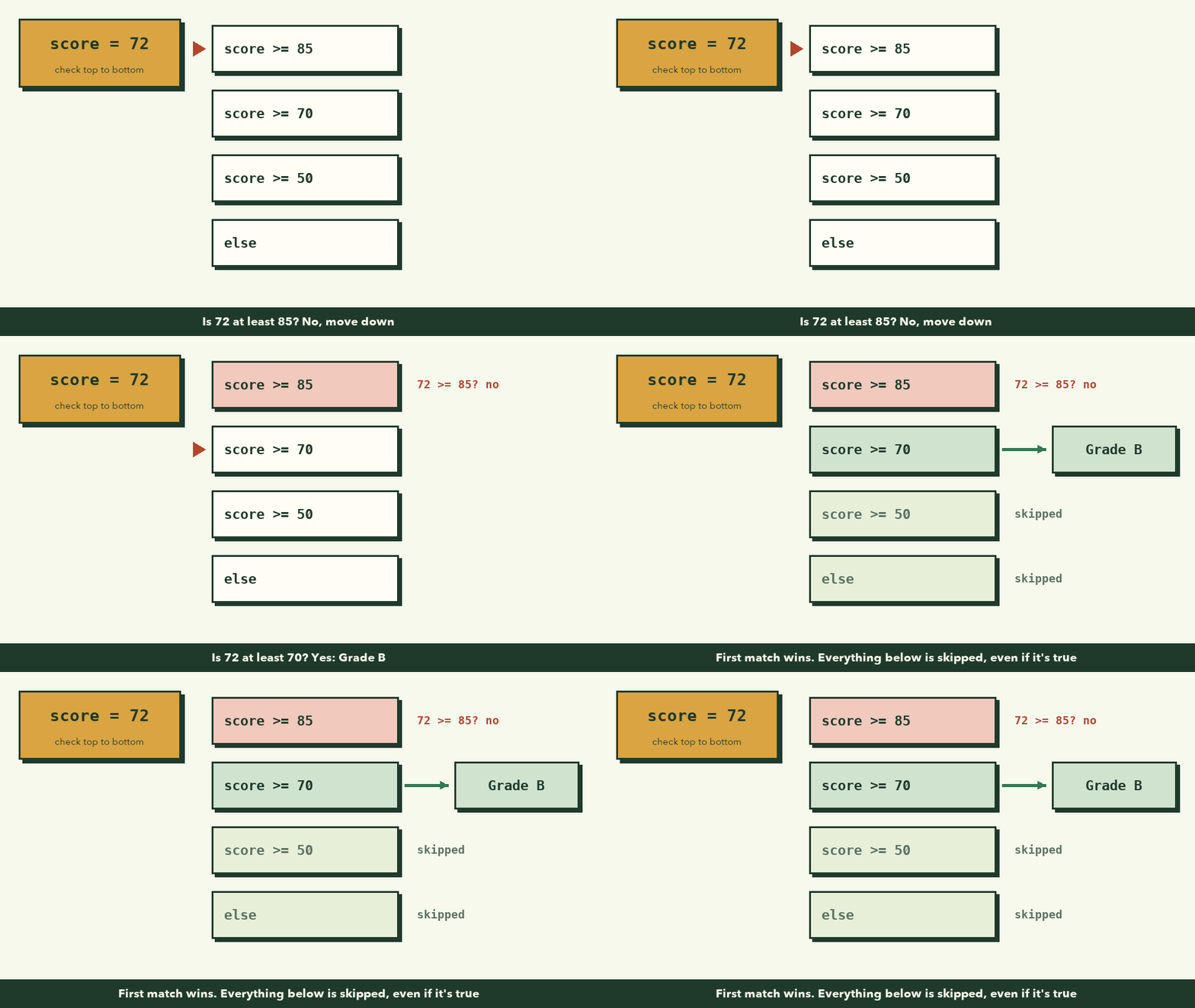
JavaScript checks each condition from top to bottom and runs the first one that's true, then skips the rest. That's why order matters. Here 72 >= 50 is also true, but we never get there, because 72 >= 70 matched first.
What would happen if you put the score >= 50 check first? Every score from 50 to 100 would get a C. Try it.
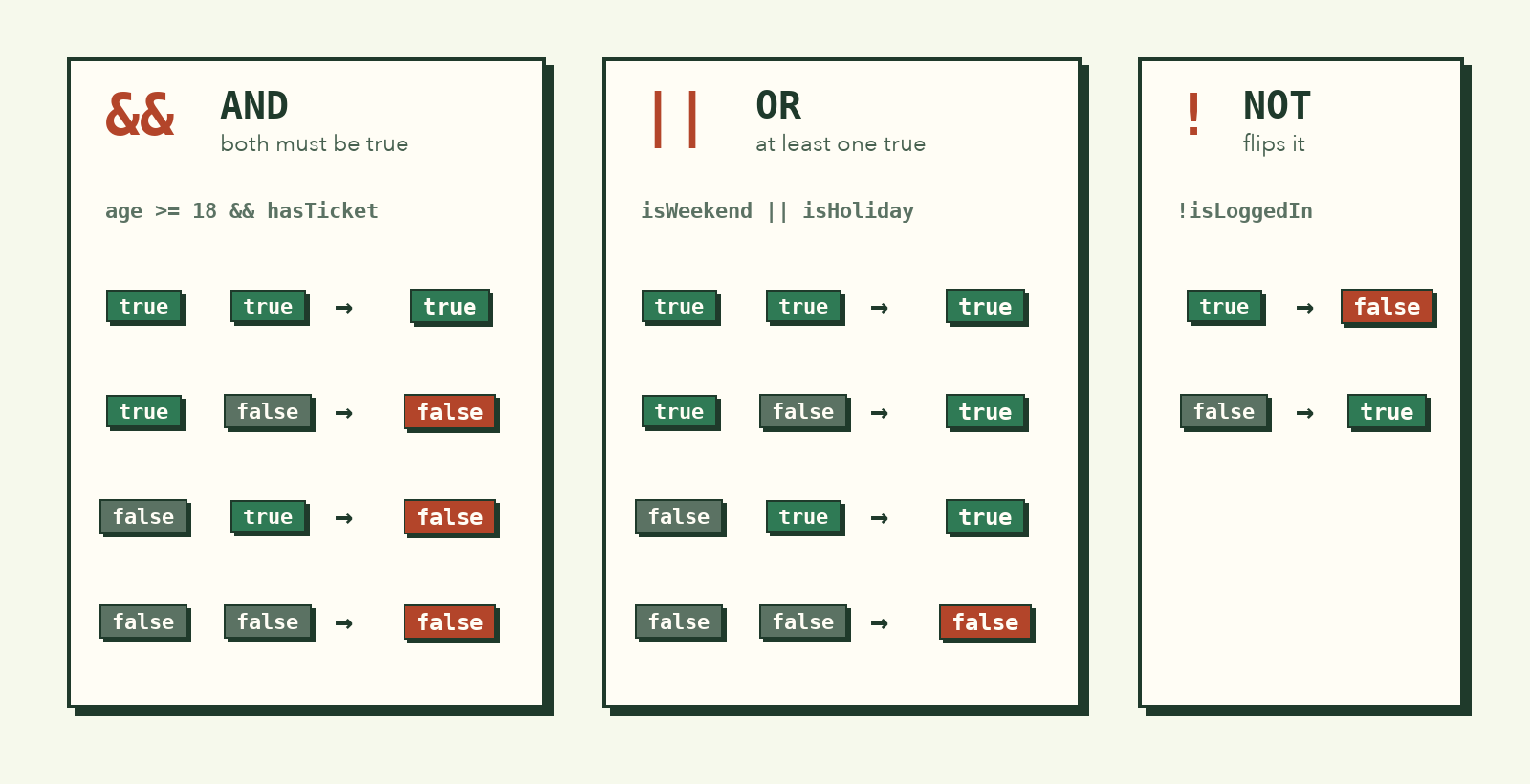
Combining conditions: and, or, not
Sometimes one question isn't enough.
| Operator | Name | True when... | Example |
|---|---|---|---|
&& |
AND | both sides are true | age >= 18 && hasTicket |
|| |
OR | at least one side is true | isWeekend || isHoliday |
! |
NOT | flips true to false and back | !isLoggedIn |
const age = 20;
const hasTicket = true;

if (age >= 18 && hasTicket) {
  console.log("Welcome to the concert!");
}

const isWeekend = false;
const isHoliday = true;

if (isWeekend || isHoliday) {
  console.log("No school today.");
}

const isLoggedIn = false;

if (!isLoggedIn) {
  console.log("Please log in first.");
}
A real example: a shop discount
The rules: members get 10% off. Anyone spending over 100,000 riel gets 5% off. Members who spend over 100,000 get 15%.
Break it down first (lesson 2!). There are four situations:
| Member? | Spent over 100,000? | Discount |
|---|---|---|
| Yes | Yes | 15% |
| Yes | No | 10% |
| No | Yes | 5% |
| No | No | 0% |
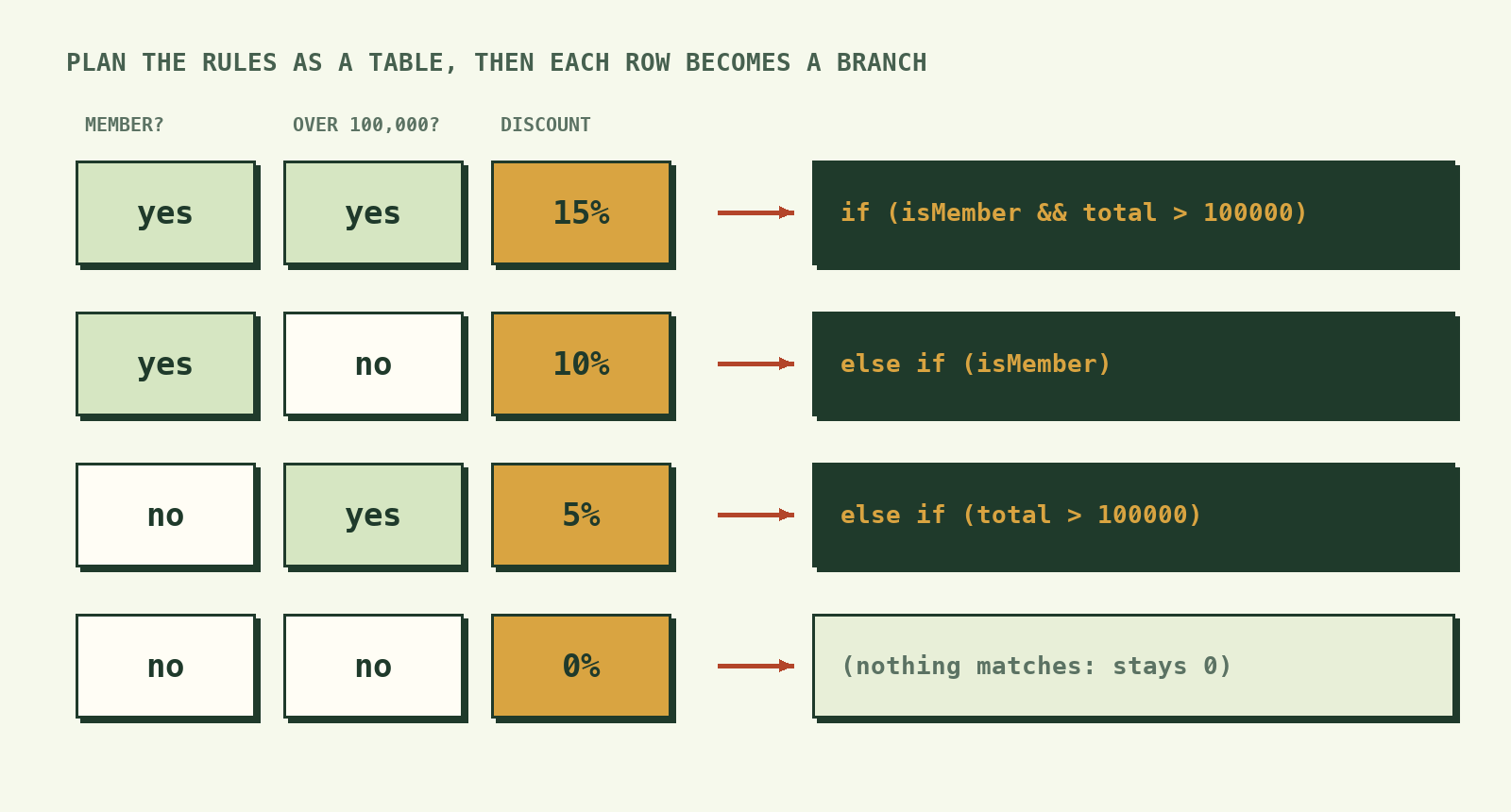
Tables like this make the code almost write itself:
const isMember = true;
const total = 120000;

let discount = 0;

if (isMember && total > 100000) {
  discount = 0.15;
} else if (isMember) {
  discount = 0.10;
} else if (total > 100000) {
  discount = 0.05;
}

const toPay = total - total * discount;
console.log(`Discount: ${discount * 100}% — pay ${toPay} riel`);
// Discount: 15% — pay 102000 riel
Notice discount uses let, because its value might change inside the if. Also notice there's no final else: if nothing matches, discount simply stays 0.
Truthy and falsy (a quick heads-up)
In an if, JavaScript also accepts values that aren't booleans. A few values count as "false": 0, "" (empty string), null, undefined and NaN. Everything else counts as "true".
const username = "";

if (username) {
  console.log(`Hello, ${username}`);
} else {
  console.log("Please enter your name.");
}
// Please enter your name.
This is handy for checking "did the user type anything?", but when in doubt, write the full comparison. Clear beats clever.
What to remember
- A condition is a question that's
trueorfalse. - Use
===and!==to compare, never=(that's for storing) or==(it converts types). if / else if / elsechecks from top to bottom and runs only the first match.- Combine questions with
&&(and),||(or) and!(not). - Plan tricky rules with a table first, then turn each row into a branch.
Try it yourself
- Write a program that says "Good morning", "Good afternoon" or "Good evening" based on a variable
hour(0–23). - A ride needs riders to be at least 120cm tall and at least 8 years old. Write the check.
- Take the grade program and add an "A+" for scores of 95 and above. Where does the new check have to go?
Next up: loops, so your program can repeat work without you copying and pasting.