Design Tokens and the Page Background
Six colors, one font, two corner sizes. Put them in CSS variables once, and every rule you write after this points back to them. Then paint the page: a soft blue gradient with a faded portrait floating behind it.
Imagine you finish the whole page, and then decide the blue should be a little warmer. If #5b79a3 is typed into fourteen different rules, you're about to hunt through the file and hope you don't miss one.
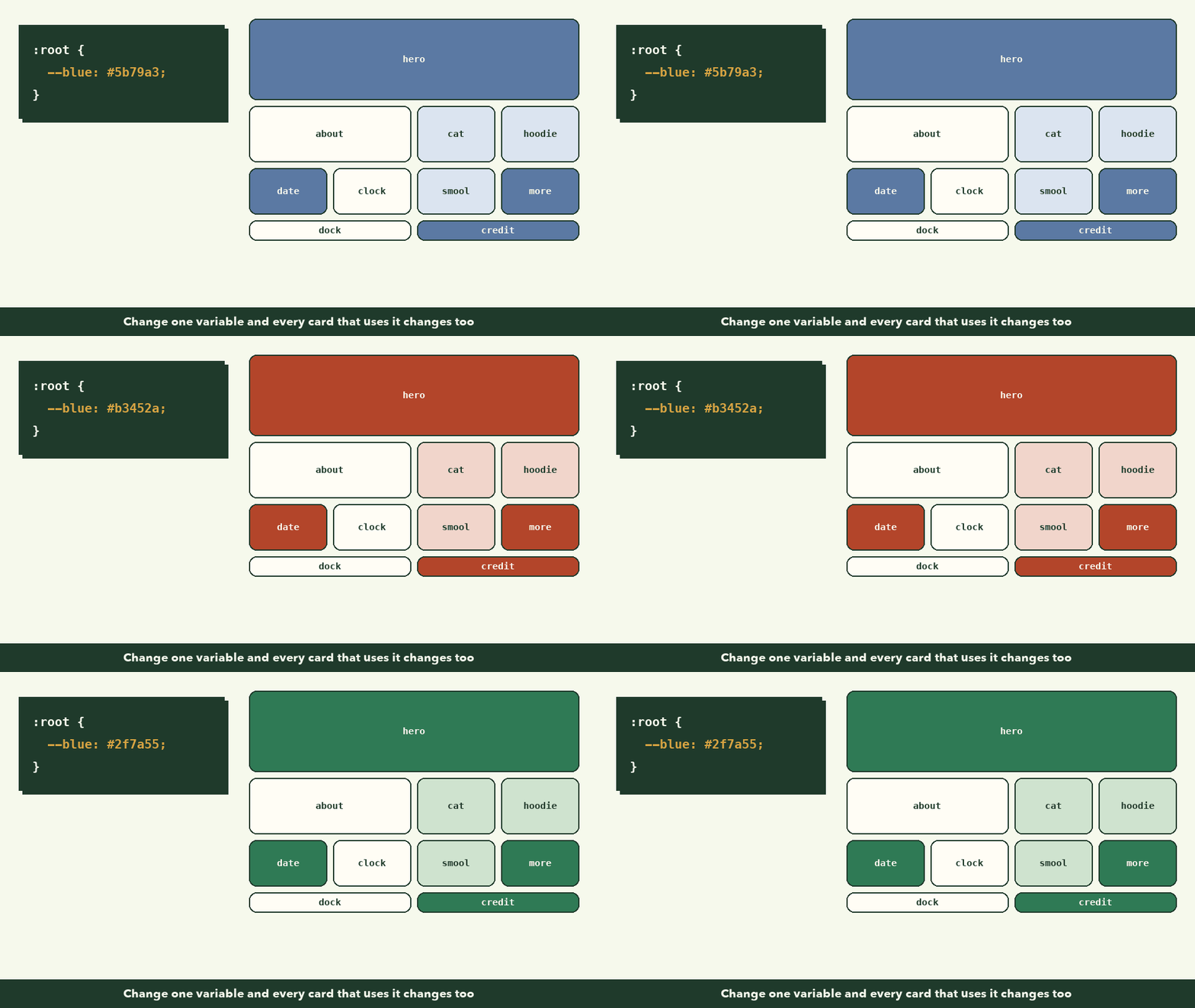
Or you could have typed it once, given it a name, and used the name everywhere. Then the change is one line.
That's what this lesson sets up. It's the least exciting part of the stylesheet, and it's the reason the rest of it stays easy.
CSS variables
In lesson 1 you wrote down the design tokens. Now they go at the very top of style.css:
/* ---------- 1. Design tokens: every color and size lives here ---------- */
:root {
  --blue: #5b79a3;
  --blue-deep: #445f86;
  --blue-soft: #dbe4f0;
  --ink: #1f2a37;
  --ink-soft: #4a5868;
  --paper: #ffffff;
  --mist: #eef2f8;
  --online: #2ecc71;

  --radius-lg: 32px;
  --radius: 24px;
  --gap: 16px;
  --shadow: 0 10px 30px rgba(31, 42, 55, 0.12);

  --font: "Poppins", system-ui, sans-serif;
}
:rootmeans the<html>element, the top of the page. Variables defined there are available everywhere.- Each
--name: value;is a custom property. The two dashes are required. - You use one with
var(--name), likecolor: var(--ink);.
Here's the payoff, live:
Naming tip: name tokens by their role, not their color, when you can.
--paperand--inkwould still make sense in a dark theme where paper is black. We kept--bluebecause the blue is the brand here, but notice how--blue-deepand--blue-softdescribe how they're used.
The font stack "Poppins", system-ui, sans-serif is a list of fallbacks: use Poppins, and if it hasn't loaded, use the system's own interface font, and if all else fails, any sans-serif.
A small reset
Browsers come with default styles: margins on paragraphs, padding on lists, images that sit inline like text. A reset tidies the few defaults that get in our way:
/* ---------- 2. Reset and page ---------- */
*,
*::before,
*::after {
  box-sizing: border-box;
}

img {
  display: block;
  max-width: 100%;
}

a {
  color: inherit;
}

h1,
h2,
p {
  margin: 0;
}
box-sizing: border-boxis the rule from the box model lesson: width now includes padding and border, so a card set to 200px stays 200px.max-width: 100%on images means no image can ever be wider than its container. That alone fixes the giant pictures from the last checkpoint.color: inheritmakes links take the color of the text around them instead of default blue.- We zero the margins on headings and paragraphs, and add spacing back deliberately where we want it.
The page background
The reference has a soft blue on the left that fades to almost white on the right. That's a linear gradient:
body {
  margin: 0;
  min-height: 100vh;
  font-family: var(--font);
  color: var(--ink);
  background: linear-gradient(90deg, var(--blue) 0%, #9fb2cc 45%, var(--mist) 100%);
  overflow-x: hidden;
}
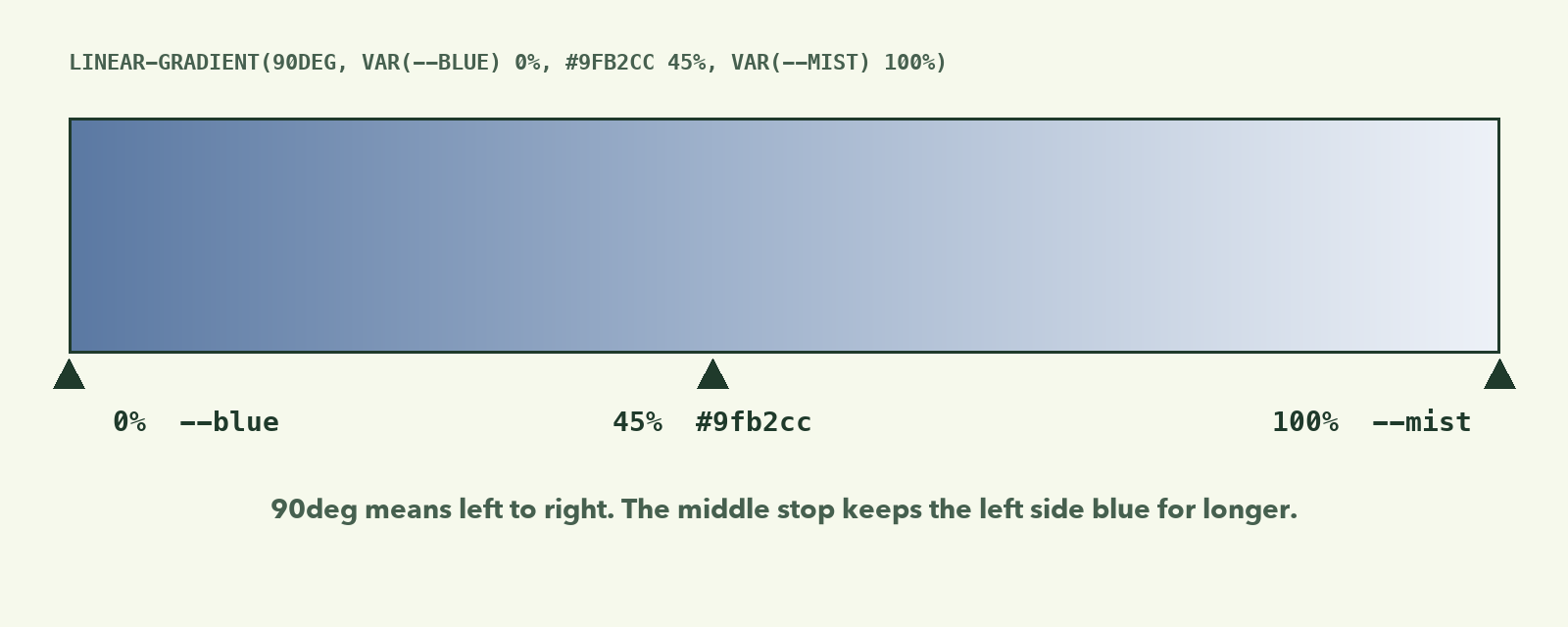
90degis the direction: 0deg points up, 90deg points right. So the colors flow left to right.- Color stops say which color to reach at each point. A plain two-color gradient fades evenly. Adding a middle stop at 45% keeps the left side bluer for longer, which matches the reference.
min-height: 100vhmakes the body at least as tall as the window, so the gradient never stops halfway down a short page.overflow-x: hiddenstops the backdrop image from making the page scroll sideways.
The faded portrait
.backdrop {
  position: fixed;
  right: -10%;
  top: -5%;
  width: min(900px, 80vw);
  opacity: 0.18;
  pointer-events: none;
  z-index: -1;
  -webkit-mask-image: linear-gradient(to bottom, #000 60%, transparent);
  mask-image: linear-gradient(to bottom, #000 60%, transparent);
}
Every line here has one job:
| Property | What it does |
|---|---|
position: fixed |
Pins it to the window, so it stays put while you scroll |
right: -10%; top: -5% |
Pushes it partly off-screen, like the reference |
width: min(900px, 80vw) |
80% of the window width, but never more than 900px |
opacity: 0.18 |
Barely there: 18% visible |
pointer-events: none |
Clicks pass straight through it |
z-index: -1 |
Sits behind everything else |
mask-image |
Fades the bottom 40% out so it doesn't end in a hard line |
min() is a CSS function that picks the smaller of two values. It's a one-line way to say "this big, but no bigger than that."
Checkpoint
Save and reload:

The layout is still one long column, and that's fine. The page now has its colors, its font, and its mood.
If something looks wrong
- The font is still Times New Roman. Check the Google Fonts
<link>is in your head, and thatfont-family: var(--font)is onbody. - A color isn't applied. Look for a typo in the variable name.
var(--bleu)silently does nothing. Your browser's DevTools will show it crossed out. - The page scrolls sideways. Check
overflow-x: hiddenonbody.
What to remember
- Put every repeated color and size in a CSS variable in
:root, then usevar(). - A small reset removes the browser defaults that fight you.
- Gradients blend between color stops; a middle stop changes where the blend happens.
- A decorative background image wants
fixed, lowopacity,pointer-events: noneand a negativez-index.
Next, the first real layout: The Top Bar with Flexbox.